
GravityWrite launched in 2023 as an all in one AI content platform for bloggers, marketers, YouTubers and small business owners. It gives you a large template library, an AI image generator, a humanizer and a chat assistant, and its cheapest annual plan works out to about $8 per month. On paper that is a strong package.
In practice, a lot of users hit the same wall: the free tier burns through its credits before you have finished testing, longer articles chew through your monthly allowance, and there is no API for anyone who wants to plug the tool into a larger workflow. If any of that sounds familiar, the five tools below are the ones worth trying next. Each section explains what the tool actually does, what it costs, who it fits, and where it falls short.
Why people look for GravityWrite alternatives
The complaints about GravityWrite cluster around four issues. None of them are fatal on their own, but together they push a lot of people to shop around.
- The trial ends before you can test anything. Users on Trustpilot and G2 repeatedly describe the free word limit as too small to judge output quality. If you want the full first hand account of how that paywall behaves, Trustvor's GravityWrite review walks through signing up, getting blocked twice, and then paying to see what is actually inside.
- Credits run out quickly on real work. The word based plans are affordable, but a few long blog posts plus image generation can exhaust a month of credits well before the month is over.
- Broad but shallow. Two hundred templates cover a lot of ground, but the SEO layer, brand voice controls and team features are thinner than what specialised tools offer.
- No API and limited integrations. If you want to connect content generation to a CMS, a CRM or an automation tool, GravityWrite does not give you a way in.
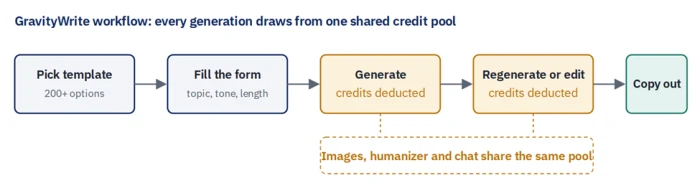
GravityWrite workflow. Where GravityWrite spends your credits. The steps in amber are the ones that drain a monthly allowance fastest.
How we evaluated the tools
Every tool on this list was checked against the same six questions, so the comparison is fair rather than a collection of marketing claims.
- Free access. Can you test real output before entering a card? Is there a permanent free plan or only a timed trial?
- Pricing model. Is it word credits, unlimited words, article counts, or seats? This determines how the cost scales with your actual usage.
- Long form quality. How much editing does a 1,500 word article need before it can be published? Google's guidance on AI generated content makes the quality of the finished piece, not the tool that drafted it, the thing that matters for search.
- SEO depth. Does the tool bring in keyword data, competitor analysis or on page scoring, or does it just add headings?
- Brand voice and team features. Can it learn your style, and can more than one person work in the same workspace?
- Integrations and automation. Is there an API, a browser extension, or a way to chain steps together?
Prices below were checked against public pricing pages and third party listings in September 2026. AI writing vendors change plans often, so confirm the current figure on the vendor's site before you buy.
Quick comparison table
| Tool | Free option | Paid from (per month) | Pricing model | Strongest at |
|---|---|---|---|---|
| GravityWrite | Small credit allowance | About $8 (annual billing) | Word credits | Template variety, low price |
| Jasper | 7 day trial only | $39 (annual), $49 (monthly) | Per seat, unlimited words | Brand voice, team content |
| Writesonic | Limited free tier | About $49, AI search visibility tiers from $79 | Article and usage based | SEO research and AI search tracking |
| Copy.ai | 2,000 words per month | About $29 to $36 | Chat plan, then workflow tiers | Workflow automation, short copy |
| Rytr | 10,000 characters per month | $7.50 (annual), $9 (monthly) | Unlimited characters | Budget drafting |
| Anyword | Trial | $39 (annual), $49 (monthly) | Per seat | Predictive performance scoring |
1. Jasper
Best for brand voice and marketing teams
Jasper is built around shared brand assets, which is why it makes more sense for a team than for a solo blogger.
What Jasper is
Jasper is an AI marketing platform that started as a long form writing assistant and has grown into a workspace for producing campaign content at scale. Its centre of gravity is the Brand Voice feature: you feed Jasper samples of your writing, a style guide and product facts (called knowledge assets), and every generation is shaped by that context. Around that sit a document editor called Canvas, a chat interface, a library of marketing templates, an SEO mode, and a browser extension that brings Jasper into Google Docs, Gmail and social tools.
Key features
• Brand Voice and audience profiles. Train one or more voices and pick a target audience so tone stays consistent across writers.
• Knowledge assets. Upload product sheets, positioning docs and FAQs so the model stops inventing details about your business.
• Canvas editor. A full document editor with inline commands for expanding, rewriting and restructuring long content.
• Campaign workflows. Generate a coordinated set of assets (blog, email, social posts, ads) from one brief.
• Unlimited words on paid plans. You pay per seat, not per word, which is the opposite of GravityWrite's credit model.
| Free plan | None, 7 day trial (card required) |
| Creator plan | $39 per month on annual billing, $49 monthly |
| Pro plan | $59 per month on annual billing, $69 monthly |
| Business plan | Custom pricing, typically quoted for larger teams |
| Current pricing | jasper.ai/pricing |
Where it beats GravityWrite No word ceiling once you are on a paid plan Genuine brand voice training rather than a tone dropdown Multi seat collaboration with shared assets Browser extension for writing inside other apps | Where it falls short Roughly five times the price of GravityWrite's entry plan No permanent free tier No built in image generator on the base plans Overkill if you publish one or two pieces a month |

Jasper workflow. Jasper front loads the work into setup. Once brand voice and knowledge assets exist, every later generation reuses them.
Verdict: Choose Jasper if two or more people produce marketing content and consistency matters more than price. Skip it if you are a solo blogger on a budget.
2. Writesonic
Best for SEO content and AI search visibility
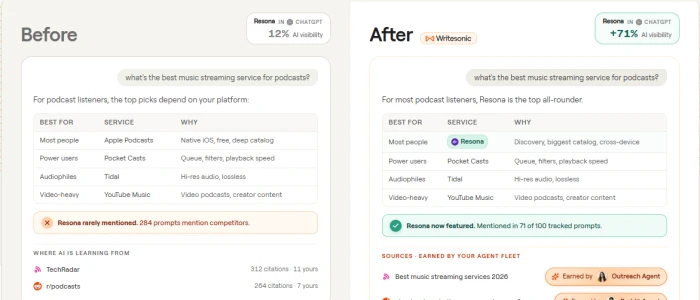
Writesonic pulls keyword and competitor data into the draft instead of leaving research to a separate tool.
What Writesonic is
Writesonic is an AI writing platform that has moved steadily toward SEO. Its Article Writer takes a target keyword, pulls live search data and competitor headings, and produces a structured draft with an on page score you can improve as you edit. Chatsonic, the built in chat assistant, can browse the web for current facts. In 2026 the company also added a tracking layer for AI search visibility, which reports how often your brand appears in answers from ChatGPT, Google AI Overviews and Gemini. That makes it one of the few writing tools that also functions as a monitoring tool.
Key features
• SEO Article Writer. Keyword research, outline generation, competitor analysis and a live optimisation score in one editor.
• Chatsonic with web access. A chat assistant that cites current sources, useful for time sensitive topics.
• AI search visibility tracking. Monitor brand mentions inside AI answer engines, which GravityWrite and most rivals do not offer.
• Surfer SEO integration. Push drafts into Surfer for deeper content scoring.
• Direct publishing. Send finished articles to WordPress and other CMS platforms.
| Free plan | Limited free tier for testing |
| Entry paid plans | Around $49 per month on article based packages |
| AI visibility tiers | From $79 per month (ChatGPT only), higher tiers add Google AI Overviews and Gemini |
| Current pricing | writesonic.com/pricing (plan structure has changed several times) |
Where it beats GravityWrite Real keyword and SERP data inside the editor Web connected chat for factual accuracy AI search visibility reports CMS publishing without copy and paste | Where it falls short Pricing has become complex and skews toward businesses Short form templates feel secondary now Higher tiers are expensive for individuals Output still needs a human pass for tone |

Writesonic workflow. The article flow runs research first, so the draft is shaped by what already ranks.
Verdict: Choose Writesonic if organic traffic is the point of your content and you want research, drafting and scoring in one place. Skip it if you mostly need social captions and ad copy.
3. Copy.ai
Best for workflow automation and short form copy
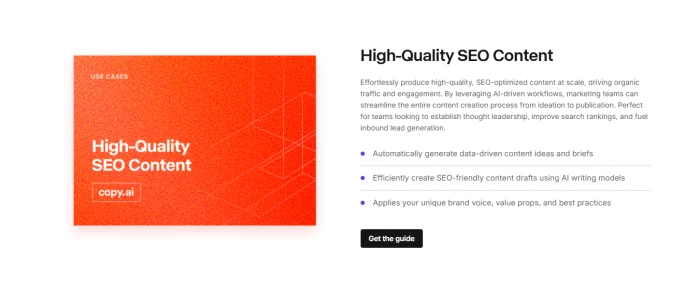
Copy.ai's free plan is the fastest way to see whether AI copy fits your process before spending anything.
What Copy.ai is
Copy.ai began as a short form copy generator and is now positioned as a go to market platform. The everyday product is a chat interface with a template library for headlines, product descriptions, emails and social posts. Above that sits Workflows, a visual builder that chains steps together: scrape a URL, summarise it, draft three variations, push the result into a spreadsheet or CRM. That automation layer is the main reason to pick Copy.ai over GravityWrite, which has no equivalent.
Key features
• Free plan with 2,000 words a month. Small, but it is a permanent free tier rather than a trial that expires.
• Chat with brand voice. Save voice profiles and reuse them in every conversation.
• Workflow builder. Multi step automations that combine research, writing and hand off to other tools.
• Batch generation. Produce dozens of ad or email variations from one input, useful for testing.
• Integrations. Connects to CRMs, spreadsheets and automation platforms, with API access on higher tiers.
| Free plan | 2,000 words per month, one seat |
| Chat or Pro plan | About $29 to $36 per month, unlimited chat words |
| Agents or Workflow tier | About $249 per month |
| Enterprise | From roughly $1,000 per month, 75 seats bundled |
| Current pricing | copy.ai/prices |
Where it beats GravityWrite Permanent free plan you can keep using Workflow automation and API access Batch variation generation for testing Stronger CRM and sales tool integrations | Where it falls short Long form quality is inconsistent The enterprise pivot buries the simple writing tools Workflow tier is expensive for individuals No image generation |

Copy.ai workflow. A workflow runs without you clicking generate. That is the feature GravityWrite does not have.
Verdict: Choose Copy.ai if you produce high volumes of short copy or want generation wired into other systems. Skip it if long form articles are your main output.
4. Rytr
Best budget alternative
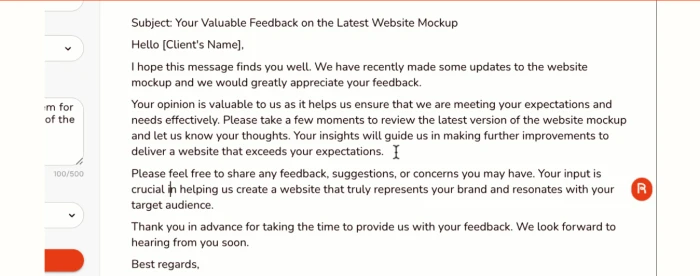
Rytr does one thing, drafting, and charges very little for it.
What Rytr is
Rytr is a lightweight AI writing assistant with about 40 use cases, 20 plus tones and support for 30 plus languages. There is no campaign layer, no SEO research and no team workspace. What you get is a clean editor, a document library, a browser extension, a plagiarism checker and a per plan character allowance that becomes unlimited on the cheapest paid tier. For anyone who left GravityWrite because the credits ran out, Rytr removes that problem at a lower price.
Key features
• Permanent free plan. 10,000 characters a month with full commercial usage rights.
• Unlimited characters from $7.50 a month. The cheapest unlimited generation plan on this list.
• Custom tone and brand voice. Save your own voice on paid plans, alongside the preset tones.
• Browser extension. Draft inside Gmail, LinkedIn and other web apps.
• Built in plagiarism check. A quick originality scan before you publish.
| Free plan | 10,000 characters per month |
| Unlimited plan | $7.50 per month on annual billing, $9 monthly |
| Premium plan | About $24 per month with more voices and priority support |
| Current pricing | rytr.me/pricing (single user only, no team seats) |
Where it beats GravityWrite Unlimited output at roughly the same price Usable free plan with commercial rights Simpler interface, faster to learn Plagiarism checker included | Where it falls short Fewer templates than GravityWrite No SEO data, no image generation, no video scripts Long form needs more structure from you No collaboration features |

Rytr workflow. Rytr keeps the flow short. There is nothing to configure beyond tone and context.
Verdict: Choose Rytr if your only complaint about GravityWrite was the credit limit and you do not need images or SEO data. Skip it if you want an all in one platform.
5. Anyword
Best for ads, email and conversion copy
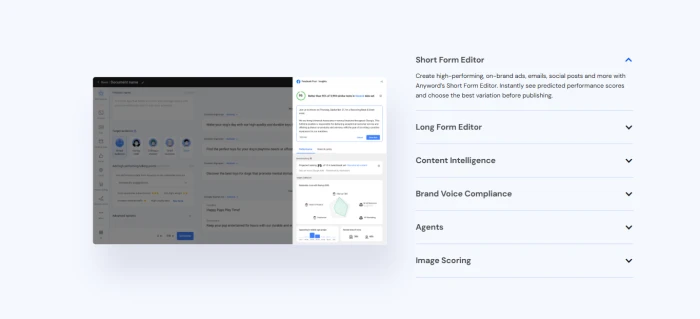
Anyword attaches a predicted performance score to every variation before you spend a cent on media.
What Anyword is
Anyword is a copy generation platform for performance marketers. Its defining feature is the Predictive Performance Score: each headline, ad or email variation gets a number, based on a model trained on historical conversion data, that estimates how well it is likely to perform with a chosen audience. You can also connect ad accounts and email platforms so Anyword learns from your real results. GravityWrite can generate ad copy, but it cannot tell you which version is more likely to work.
Key features
• Predictive Performance Score. Rank variations before you test them live.
• Target audience profiles. Score and rewrite copy for a specific persona.
• Brand voice and messaging bank. Store approved claims, terms to avoid and tone rules.
• Channel integrations. Connect Meta, Google, LinkedIn and email platforms for a closed feedback loop.
• Landing page and email builders. Long form templates exist, but the tool is strongest on short conversion copy.
| Free plan | Trial only |
| Starter plan | $39 per month on annual billing, $49 monthly |
| Data Driven plan | About $99 per month, adds integrations and analytics |
| Business | Custom pricing |
| Current pricing | anyword.com/pricing |
Where it beats GravityWrite Performance prediction on every variation Feedback loop from real ad and email data Messaging bank for compliance and consistency Audience specific rewriting | Where it falls short Expensive for anyone not running paid media Blog and long form output is average No image or video generation Predictions are estimates, not guarantees |
Anyword workflow. Anyword closes the loop: live results from connected channels retrain the score for the next round.

Verdict: Choose Anyword if you run paid ads or email campaigns and want data behind copy decisions. Skip it if you mostly write blog posts.
GravityWrite vs the alternatives: key differences
Template counts are the least useful way to compare these tools. The differences that actually change your monthly experience are below.
Difference 1: How you pay for output
GravityWrite sells word credits. A long article, an image and a few regenerations all draw from one pool, so heavy months cost more or stop early. Jasper, Rytr and Copy.ai's chat plan sell unlimited generation and charge per seat or per plan instead. Writesonic charges per article on its content plans. Anyword charges per seat. If unpredictable credit use was your problem, the unlimited models fix it directly.
Difference 2: What you can test before paying
GravityWrite's free allowance is small enough that many users hit the paywall before they have judged the output. Rytr and Copy.ai offer permanent free plans that never expire. Jasper and Anyword offer timed trials that require a card. Writesonic sits in between with a limited free tier. Which of these feels fair depends on how much testing you need to do.
Difference 3: Depth of SEO support
GravityWrite can produce SEO friendly structure and meta descriptions, but it does not bring in keyword volume, competitor pages or a scoring model. Writesonic does all three inside the editor and adds AI search visibility tracking. Jasper has an SEO mode and works with Surfer. Rytr, Copy.ai and Anyword treat SEO as a light add on at best.
Difference 4: Brand voice versus tone selection
GravityWrite lets you pick a tone from a list. Jasper, Anyword and Copy.ai let you train a voice from your own samples and reuse it across every generation, and Rytr allows a custom voice on paid tiers. For a single blogger the gap is minor. For a brand with several writers it is the whole point.
Difference 5: Automation and integrations
GravityWrite has no API, so it stays a manual tool. Copy.ai's workflow builder, Anyword's channel connections and Writesonic's CMS publishing all let content move without copy and paste. Jasper and Rytr cover this partly through browser extensions.
| Criterion | GravityWrite | Jasper | Writesonic | Copy.ai | Rytr | Anyword |
|---|---|---|---|---|---|---|
| Output limit on paid plan | Word credits | Unlimited | Per article | Unlimited chat | Unlimited | Per seat |
| Permanent free plan | Small allowance | No | Limited | Yes, 2,000 words | Yes, 10,000 chars | No |
| Keyword and SERP data | No | Partial | Yes | No | No | No |
| Trainable brand voice | Tone list only | Yes | Yes | Yes | Paid tiers | Yes |
| Image generation | Yes | Add on | Yes | No | Limited | No |
| API or workflows | No | Business tier | Yes | Yes | Limited | Yes |
| Team seats | Limited | Yes | Yes | Yes | No | Yes |
Which alternative should you pick

Start from the problem that made you leave GravityWrite, not from the longest feature list.
Match the tool to the reason you are switching:
• Credits kept running out and you write alone: Rytr.
• You want to test properly before paying anything: Copy.ai or Rytr on their free plans.
• Search traffic is the goal: Writesonic.
• Several people write for one brand: Jasper.
• You run paid ads or email campaigns: Anyword.
• You want generation connected to other tools: Copy.ai, or Writesonic for CMS publishing.
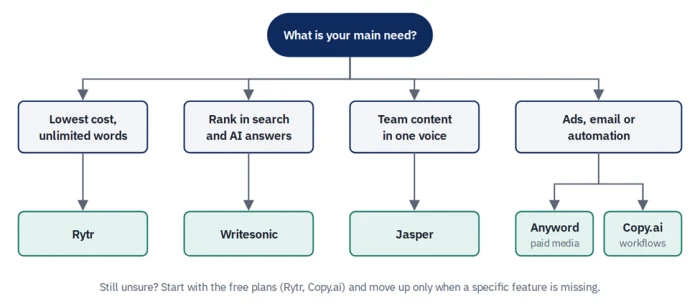
Decision flow. One question, five answers. Most people can place themselves in a single branch.
Conclusion
GravityWrite is cheap and broad, which is exactly why it is easy to outgrow. Once you know which limitation is costing you time, the replacement is usually obvious: Rytr for unlimited words at a low price, Writesonic for SEO and AI search visibility, Jasper for teams that need one consistent voice, Copy.ai for automation and short form volume, and Anyword for copy that has a performance score attached.
The safest way to decide is to run your next real piece of content through two of them on a free plan or trial, count how many edits each draft needs, and pick the one that saved you the most time. Feature lists change every quarter. Editing time is the number that matters.