

The web is crowded with "every AI tool in one spot" directories, and plenty of them are little more than dressed-up link farms. So when OpenFuture AI turned up, billing itself as the biggest AI-tools directory with the quickest update cycle and the most reliable database, casually browsing it was not going to settle anything. I wanted to see whether the claims held.
My approach was deliberately plain: start on the homepage, lean only on the site's own filters to track down a tool, and follow that path right up to the tool's front door. No jumping to Google, no saved bookmarks. A directory that truly works should walk me from 40,000-plus listings to a single genuinely useful tool without friction. What follows is the whole walkthrough, one stop at a time, with candid notes at every stage, alongside what real users on Trustpilot, G2, and independent review sites report about the things I ran into.
First look: bold promises behind a single search bar

Figure 1: OpenFuture AI's landing page, advertising 75 categories, 40,502 tools, and one search field.
The landing page makes its case within the first few seconds. The figures sit right inside the search placeholder: 75 categories and 40,502 tools. That is a clever choice, because it turns a fuzzy brag like "largest" into a number you can actually count. Navigation stays sparse, just Categories, AI Tools, a language toggle, and Login. Scroll a little and the catalog kicks in immediately, sorted under All, Recommended, and Newly Added tabs.
MY OBSERVATION What I liked was the absence of marketing padding between me and the tools. Many directories hide their catalog behind newsletter popups and sponsor banners; here the real listings were a single scroll away. The dark neural-network backdrop is a well-worn AI cliche, but at least it stays out of the way. What did give me pause was the scale of the claim. A 40,502-tool catalog is enormous, and enormous catalogs tend to come with shaky quality control. I filed away a reminder to check whether the deeper entries felt hand-picked or simply scraped. |
STEP VERDICT A tidy, quick, self-assured opening. The headline number looks great on paper. The open question is whether all that volume has come at the cost of quality. |
The real tool count shifts more than the homepage suggests
One thing worth adding after going back to OpenFuture in August 2026: the headline catalog figure should not be read as a fixed, audited inventory.
Various currently indexed OpenFuture pages report totals somewhere in the 40,200 to 40,500 range, all while still listing 75 categories. One page showed 40,244 tools, another 40,252, and a separate indexed version put it at 40,502.
That is not automatically a red flag. Directories are always doing things like:
• Adding new tools
• Dropping dead products
• Merging duplicates
• Reclassifying listings
• Refreshing cached pages
• Reprocessing submissions
Still, it shifts how I would read the homepage. Rather than claiming “OpenFuture holds exactly 40,502 verified AI products,” I would phrase it as “OpenFuture currently indexes somewhere around 40,000 AI-tool listings.” That is a far more defensible summary of what the number really stands for.
In any case, the exact tally is not the actual product. What matters is whether OpenFuture can compress that massive inventory into a shortlist you can use.
Pricing filters are where most directories fudge things. This one largely stays honest.
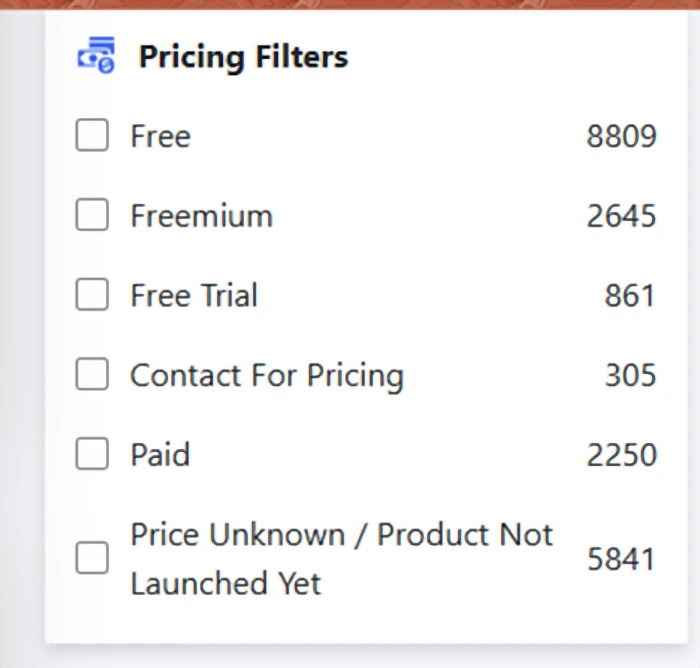
Figure 2: Pricing filters with live tallies, including Free (8,809), Freemium (2,645), and Free Trial (861).
Keep scrolling and the filter sidebar appears, and this is the point where OpenFuture AI started to win me over. Pricing splits into six straightforward buckets, and, importantly, "Free," "Freemium," and "Free Trial" each get their own line. Anyone who has gone tool-hunting knows the sting of clicking something labeled "free" only to hit a seven-day trial guarded by a credit-card form.
MY OBSERVATION The most revealing bucket, to me, was "Price Unknown / Product Not Launched Yet," sitting at 5,841 entries. Most directories would quietly fold those into "Free" or bury them completely. Flagging almost 6,000 tools as essentially unverified is a genuine transparency call, yet it also backs up my earlier hunch: a sizable share of that 40,502 headline figure is padding from tools nobody has fully checked, or that have not even shipped. Even so, 8,809 tools tagged as truly free is a serious pool to work from, and the live counts beside each checkbox signaled that the filters were pulling real data rather than sitting there as decoration. |
STEP VERDICT An honest pricing taxonomy, which is uncommon here. The "unknown" bucket chips away at the headline count, but I will take it labeled over hidden any day. |
A pricing label is a starting point, not a promise
The pricing filters are still among OpenFuture's stronger features, but there is a meaningful gap between the directory's metadata and a vendor's live pricing.
Right now OpenFuture offers filters for buckets such as:
• Free
• Freemium
• Free trial
• Contact for pricing
• Paid
• Price unknown / product not launched yet
That is helpful for discovery. The catch is that AI pricing moves fast. A product filed under "free" might actually mean:
• Unlimited free use
• A capped number of free scans
• Daily free credits
• A free account with paid extras
• A small no-login demo
GPTZero is a clean illustration. Tagging it "free" is not wrong, since anyone can run free AI-detection scans. But GPTZero also sells paid tiers, larger usage allowances, Advanced Scan features, team plans, and API access.
So the rule I would now apply is simple: lean on the directory to learn the pricing model, then head to the tool's own site to confirm the real limits before deciding whether it fits your budget.
75 categories, alphabetical, searchable, and occasionally redundant
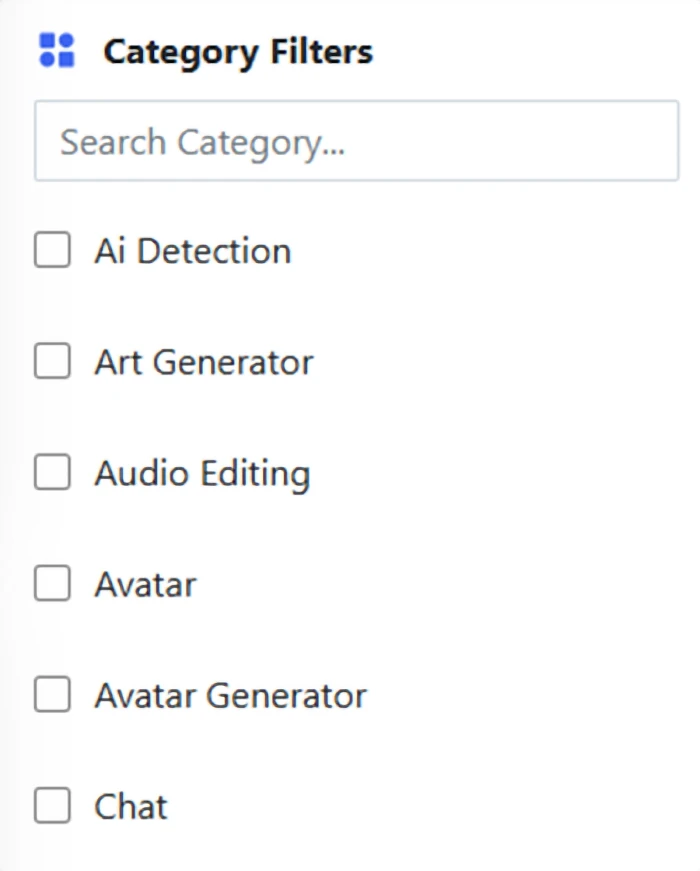
Figure 3: Category filters with a built-in search box, where "AI Detection" stands as its own category.
Just beneath pricing sits the category panel. The built-in "Search Category" field is a smart addition, because scrolling through 75 categories would get tiresome quickly. The list runs alphabetically and uses checkboxes, so you can layer several categories on top of your pricing filters.
MY OBSERVATION My gripe surfaced almost at once: "Avatar" and "Avatar Generator" exist as two distinct categories, parked right beside each other. That is a taxonomy warning sign. If those two overlap, others probably do as well, which means certain tools are likely scattered across categories where one tighter label would serve people better. On the plus side, "AI Detection" getting its own standalone category was exactly what I was hoping for. In a lot of directories, detection tools get buried under "Writing" or "Education," which makes them almost impossible to pull out on their own. |
STEP VERDICT Workable and searchable, even if the taxonomy could use a tidy-up. For what I was after, it did exactly the job. |
Overlapping categories are more than a surface issue
The Avatar / Avatar Generator pairing seems trivial, but taxonomy quality matters more and more once a catalog climbs past 40,000 listings.
OpenFuture's current category setup holds dozens of overlapping ideas, among them:
• Copywriting
• Copywriting Assistant
• Research
• Research Assistant
• Social Media
• Social Media Assistant
• Avatar
• Avatar Generator
• Image Generator
• Generative Art
That opens the door to two kinds of trouble.
False exclusion
A genuinely useful tool ends up tagged under a neighboring category and vanishes from a tightly filtered search.
False inclusion
A tool technically touches a category without actually doing the job the user has in mind.
The Notbyai listing from my original run showed off that second problem perfectly. It deals with AI-authorship verification, but it is not an AI-text detector in the way GPTZero is. The takeaway: OpenFuture is at its best when categories are used to narrow a search, not to guarantee that every result performs an identical function.
The filters genuinely filter, and GPTZero turns up near the bottom
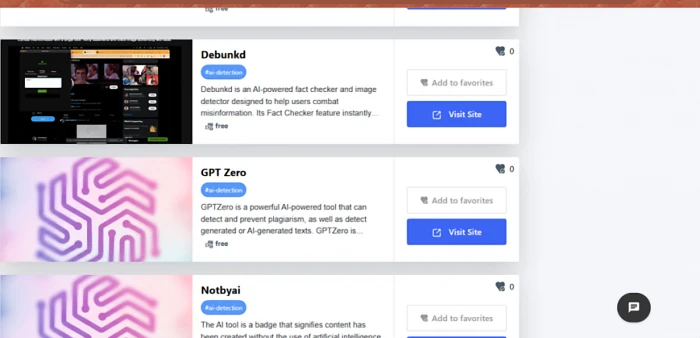
Figure 4: The shortlist after stacking "Free" and "AI Detection", showing Debunkd, GPT Zero, and Notbyai.
This was the moment of truth. I ticked "Free" under pricing and "AI Detection" under categories, and the listing collapsed into a tight set of tools. Every card carried the basics: a name, a brief description, the category tag, the pricing tag, a favorites counter, and two buttons ("Add to favorites" and "Visit Site"). Three of the results stood out for how unlike one another they were:
• Debunkd: an AI-driven fact checker and image detector built to push back on misinformation.
• GPT Zero: the widely known detector for AI-written text and plagiarism.
• Notbyai: not a detector at all, but a badge that certifies content was produced without AI.
MY OBSERVATION The filtering felt properly accurate. Every card on screen was a legitimately detection-adjacent tool tagged as free, so stacking the two filters held together. The descriptions run short but say enough to tell the tools apart at a glance. Two weak spots stood out: every favorites counter read 0, which hints the community layer is not very lively yet, and a few thumbnails were just a blurred OpenFuture logo instead of an actual product screenshot. On top of that, Notbyai sitting in "AI Detection" is a slightly loose fit, since it certifies rather than detects. I went with GPT Zero, partly because it is the highest-stakes tool on the list (teachers and editors lean on it to make real calls about real people's work), and partly because it was the ideal candidate for checking whether the directory's data (free, AI detection) lined up with reality. |
Having run through this a few times, I would slot a verification step between "find a tool" and "trust the listing." Before opening an unfamiliar AI product, run a quick check:
1. Does the listing actually describe what the tool does?
2. Is the pricing label believable?
3. Is the product still up and running?
4. Does the outbound link point to the expected official domain?
5. Is the listing recent enough to reflect any major product changes?
For GPTZero, all of that checked out. OpenFuture's current GPTZero listing still frames it as an AI detector and sends users toward its detection features. But one accurate entry does not prove the other 40,000 records are equally fresh. The bigger a directory grows, the more valuable the occasional random spot check becomes.
STEP VERDICT The central promise, trimming 40,000 tools to a relevant shortlist in a couple of clicks, came through. Thin social signals and generic thumbnails are cosmetic, not functional, shortcomings. |
The handoff: a single click straight to GPTZero's front door
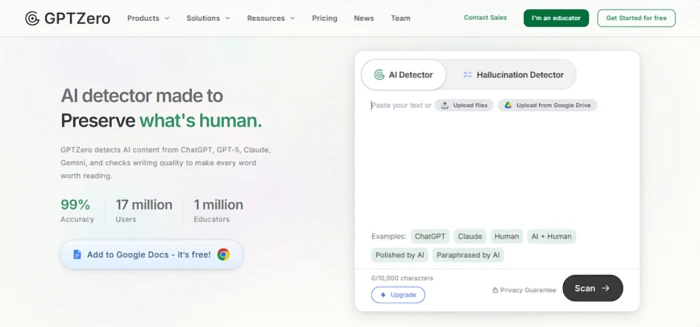
Figure 5: GPTZero's homepage after "Visit Site", with its free scan box, 10,000-character cap, and sample texts.
Clicking "Visit Site" dropped me straight onto gptzero.me. No interstitial ad page, no chain of redirects, no affiliate splash. That alone sets OpenFuture apart from a surprising number of directories that squeeze money out of every outbound click. And since the entire aim of my run was to follow the trail to its end, arriving here meant I was now indirectly probing GPTZero itself. The scan box takes center stage: paste up to 10,000 characters free, or upload a file. The example chips are a clever bit of onboarding. A single click loads a sample of ChatGPT text, Claude text, human text, or thornier hybrid cases such as "Polished by AI" and "Paraphrased by AI," letting you watch the detector work before you hand over your own writing.
MY OBSERVATION First, the directory's data held up. OpenFuture tagged GPT Zero as free with an accurate description, and the live site backed both up: there is a genuinely free scanning tier plus an Upgrade route for heavier use. That is the homepage's accuracy claim surviving an actual spot check. Second, GPTZero makes a strong first impression on its own. The interface feels welcoming, and the presence of a Hallucination Detector tab and hybrid-text samples shows the team gets that the real world is not a tidy split between "AI wrote this" and "a human wrote this." My skeptical streak, though, snags on the "99% accuracy" banner. No AI detector running in the wild is dependably 99% accurate across paraphrased, edited, and blended text, and false positives on human writing carry real consequences for students. I would read that figure as marketing and treat the tool's output as a signal, never a verdict on its own. |
STEP VERDICT A clean, honest handoff from directory to tool, with the listing's metadata matching reality. GPTZero itself is polished and generous with its free tier. Just approach its accuracy claims with a healthy dose of skepticism. |
Reality check
My run was one session on one afternoon, so before wrapping up I compared my impressions against what actual users and independent reviewers report about both platforms.
On OpenFuture AI
| Independent reviewers (Zerlo, Mobilebd, Airesult) |
| Third-party write-ups paint OpenFuture as one of the more recognizable AI directories, with SEO trackers pegging traffic at roughly 120,000 to 131,000 monthly visitors. Reviewers regularly commend the well-organized, beginner-friendly browsing and the convenience of weighing tools in one place instead of across ten browser tabs. They add a fair caveat too: a directory is only as good as the third-party tools it lists, and none is ever truly complete. |
| Blogger reviews (Sushilprompt and others) |
| Several bloggers point to the daily update cycle as OpenFuture's true differentiator and describe it as discovery-first rather than aggressively affiliate-driven, which squares with my own experience of the clean, direct "Visit Site" handoff. One reviewer described using it just as I did: filtering for a free alternative after a paid tool trimmed its free credits. |
| Industry roundups (Radiustheme, GitHub AI-directories list) |
| OpenFuture shows up often in "best AI directory" roundups, credited with detailed tool profiles, quick updates, and an accurate database. A GitHub community list of AI directories also groups it among the larger, more current databases, which lends weight to its visibility claims even if the precise tool count is hard to confirm independently. |
| Where the reviews land: they mostly echo my own run. No serious voice disputes the breadth or the usability. The recurring caveat, that listing quality varies, is the very one I raised with those 5,841 "price unknown" entries. |
On GPTZero
| G2 · 4.3 / 5 from 101 verified reviews |
| G2 reviewers tend to rate GPTZero highly, praising its ease of use, sentence-by-sentence highlighting, and usefulness for educators and content teams. Yet even the favorable reviews keep circling the same flaw: occasional false positives, where clearly human writing gets flagged as AI, which makes the results hard to trust on their own. One verified reviewer also grumbled that detection results shifted between scans and that the free version's word limits felt tight. |
| Trustpilot · positive voices |
| The satisfied reviewers are genuinely satisfied. Students and casual users call it fast and efficient, say the free plan already delivers a useful read on whether text looks AI-generated, and describe the interface as welcoming for newcomers. A handful of educators single out the grading and feedback features for marking assignments. |
| Trustpilot · critical voices · around 2.4 / 5 overall |
| The overall Trustpilot score tells a far harsher story, with inaccuracy dominating the complaints. One user reported that writing entirely their own came back as 97% AI, while a different detector read it as human. A parent recounted the tool flagging her daughter's teacher-required quotations as AI. A writer said years of honed academic style kept tripping the detector, pushing them to warp their own prose just to pass. Several users noted the same text scanned twice produced different results, and that support was hard to reach. |
| Independent testing (Cybernews, Stanford research) |
| Independent testers found GPTZero strong at catching raw, unedited AI text but far shakier on edited or paraphrased content. The Cybernews reviewer noted it even flagged articles they had written years before AI tools existed. The most sobering figure comes from a Stanford study (Liang et al., 2023): AI detectors labeled 61.3% of TOEFL essays by non-native English speakers as AI-generated, and every one of those essays was human-written. Simpler vocabulary and formulaic structure, common in second-language writing, read like "AI patterns" to these detectors. |
| Where the reviews land: the gap between G2 (professionals treating it as one signal among several) and Trustpilot (students and writers on the receiving end of false flags) captures my own wariness about the 99% accuracy banner exactly. GPTZero is a useful signal and a genuinely generous free tool, but the real-world reviews confirm it should never be the only judge of anyone's work. |
Does OpenFuture AI hold up?
Yes, with caveats. As a discovery engine it did precisely what a directory should: it carried me from 40,000-plus tools to one relevant, accurately described, genuinely free tool in under two minutes and five clicks, with no dark patterns along the way. The pricing taxonomy is unusually honest, the filters draw on real data, and the outbound links go straight to the source. Independent reviews reinforce all of that.
The caveats are the ones I raised at each stop: the headline tool count is padded by nearly 6,000 unverified "price unknown" entries, the category taxonomy carries overlaps that need trimming, and the community layer (favorites, engagement) feels dormant. None of these derailed my run, but they are what separates a good directory from a great one.
My advice if you use it: ignore the raw tool count, head straight for the pricing and category filters, stack them, and let the shortlist do the heavy lifting. That workflow is where OpenFuture AI truly shines. And if the trail leads you to an AI detector like GPTZero, keep the reviews in mind: treat its output as a signal, not a sentence.
8.5/10 FILTERING & SEARCH | 8/10 DATA ACCURACY | 6/10 TAXONOMY & CURATION | 7.5/10 OVERALL EXPERIENCE |