
3.5 out of 5 Fast, good-looking output for images and voice on a free tier that actually exists. Video is locked behind a login and credits, and the upgrade prompts never let up. Best suited to: Quick AI images and natural-sounding voiceovers from a single dashboard, plus YouTube and PDF summaries on the side. What the free tier covers: Two images per day and up to 100,000 characters of text to speech. Video is effectively paid only. Plans seen during testing (billed yearly): Pro $9, Unlimited $14.50, Max $49.50 per month under a “Save 50%” countdown. By September the same page showed a 30% discount and higher prices. Main irritations: Pushy upsells, a confusing two-currency credit system, and free image results that vanish unless you download them on the spot. |
What NoteGPT actually is
NoteGPT started life as a Chrome extension that summarized YouTube videos, and that heritage still shows. The extension is a Featured listing in the Chrome Web Store with a 4.9-star rating, and summarization of videos, web pages, and PDFs remains the core of the web app. Over time, the company has attached a much wider toolset to that base. Today the product family covers four broad jobs:
• Summarizing: YouTube videos (with or without captions), articles, PDFs, and uploaded audio or video, with transcripts, timestamps, key points, and mind maps.
• Repurposing: turning notes into slide decks, narrated podcasts, flashcards, and translated subtitles.
• Creating: AI images, AI video, text to speech (with voice cloning on paid plans), AI writing, and AI chat.
• Study help: math and homework assistance, an AI detector, and an AI humanizer.
This review concentrates on the three creative tools, because they are the ones the marketing leans on hardest and the ones where free-tier limits bite most. The summarizer side gets its own shorter section further down.
How I tested
I used the NoteGPT.io web app in a normal browser, starting without an account and creating one only when the product refused to go further. Three tools were under the microscope: the AI Image Generator, the AI Video Generator, and Text to Speech. For each, I wanted answers to three questions. How long does output take? How good is it? And how hard does the product work to move you onto a paid plan?
Every tool was given a practical prompt rather than a synthetic benchmark, and I noted each usage limit, warning banner, and upgrade prompt as it appeared. Prices, credit costs, and caps below are what the live interface displayed on the day of testing. I revisited the public pricing page three months later, and as you will see, the numbers had moved.
The sections that follow are organized by tool rather than by click, starting with a quick look at the dashboard and then the tool that impressed me most.
The dashboard and the marketing claims
The first screen is busy. A dense left sidebar lists AI Notes, AI Voices, AI Images, AI Videos, AI Slides, AI Chat, and AI Writer. The central area is given over to social proof: a Chrome Store badge showing five stars, a claim of more than 80 million users, a claim of over 12,000 schools and teams, and a row of logos that includes YouTube and several universities. A “Save 50%” countdown timer sits in the bottom corner and appears to be permanent.
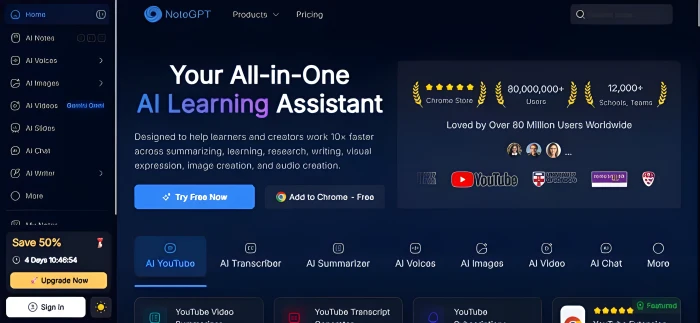
The landing dashboard. Note the sidebar, the user-count claims, and the timer that never leaves.
None of those figures come with independent verification on the page. Treat them as the company’s own marketing rather than data. The Products menu at the top is where the creative tools live; the image generator sits alongside an Image Editor, a Headshot Generator, and an Object Remover.
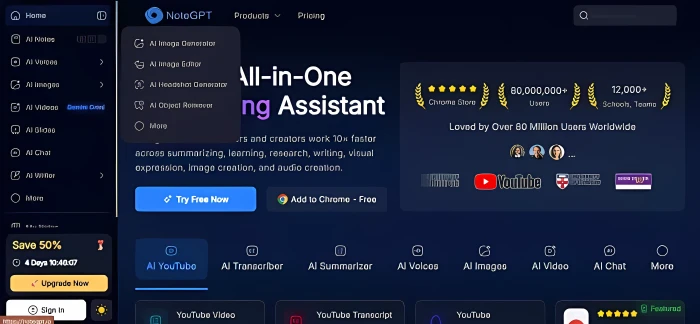
The Products menu. I started with the AI Image Generator, but took the tools in a different order below.
Text to speech: the standout
Worked on the free tier
The AI Voices tool turned out to be the most pleasant surprise of the session. I pasted a 688-character news paragraph about Amazon and its Trainium AI chips, kept the default free voice (Lily Parker, described in the interface as an American English young adult female), and clicked Generate Speech. The free tier accepts up to 100,000 characters per job, so length was never a concern. The wider voice library is much larger than the one free default, reportedly more than 100 voices across 40-plus languages, though most of it sits behind the paid tiers.
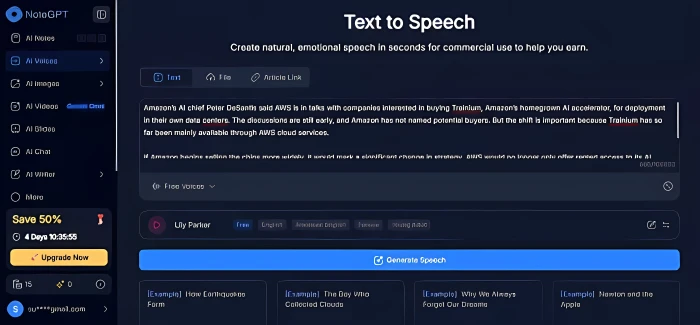
The input screen. The pasted paragraph, the default free voice, and the generate button.
Audio was ready within seconds. What came back was a 48-second clip in a tidy player with play, scrub, and playback-speed controls, plus Download, Share, Listen on Phone, and New buttons. The voice was clear and natural, comfortably good enough for a rough voiceover or an accessibility read-through.
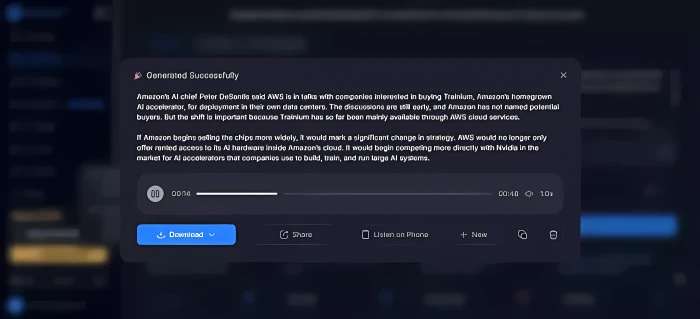
The finished clip. Forty-eight seconds of audio, generated in a few seconds.
Export options went further than I expected from a free tool. Audio can be saved as MP3 at 44.1 kHz and 256 kbps or as WAV at 44.1 kHz, there is an Advanced menu for finer control, and the source text can be downloaded alongside it as Markdown or plain TXT.
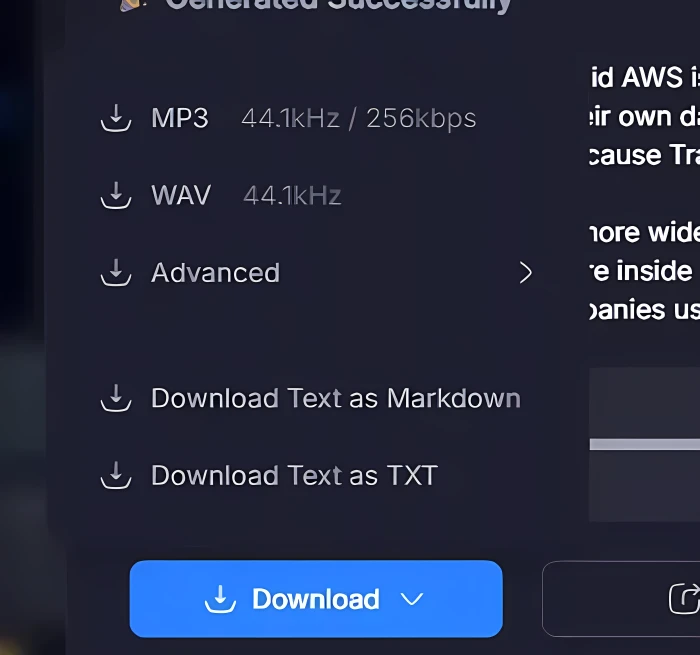
Audio and text export options, all available without paying.
Image generator: excellent output, one catch
Worked, with a catch
The generator runs on a model labeled GPT Image 2 and offers aspect ratio (I kept 16:9), resolution, a Fast or Think mode, and the option to attach reference images. Logged-out visitors get two images a day. My prompt was simple: an Indian woman in a yellow outfit, photographed in golden-hour light.
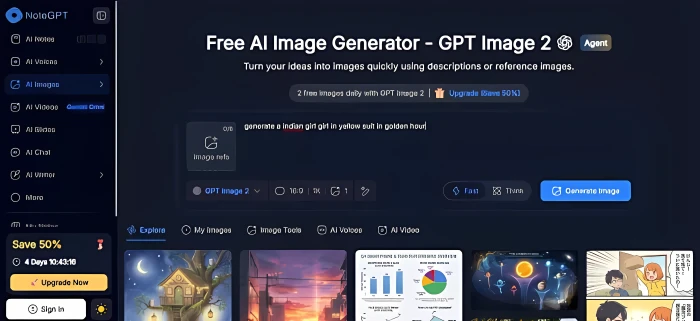
The prompt screen. The free daily allowance is shown right above the prompt box.
The result arrived quickly and looked far better than I expected from a no-signup generation. It was a 1672 by 941 image with convincing warm lighting, detailed jewelry, and fine embroidery on the clothing. The results panel offered Remove, Adjust Ratio, Upscale, and Translate options for further editing.

The full output. Realistic light and fine fabric detail from a free, signed-out generation.
The catch appeared in the same panel. A banner warned that because I was not signed in, the image would not be saved and I should download it now. The free preview is real, but nothing is stored for you. Close the tab without downloading and the image is gone.
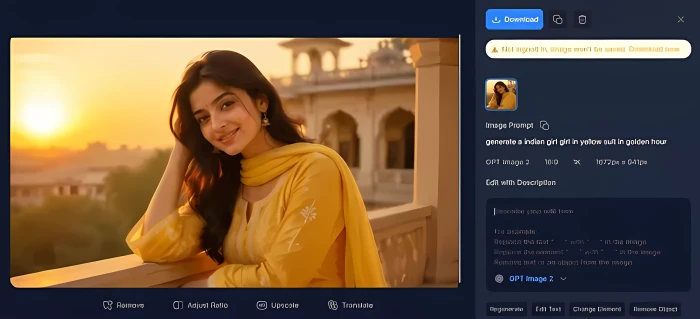
The warning banner. Download immediately or lose the image.
One caveat from the public reviews: the image tools are moderated with a fairly heavy hand. Edits such as face swaps and pose changes are refused on safety grounds, according to the company’s own replies to reviewers, and in early 2026 several users reported a bug that blocked the letter “E” in the prompt box, which the company later said it fixed.
Video generator: never got past the paywall
Paywalled
Encouraged by the image result, I opened the AI Video Generator, which is branded as running on a model called Gemini Omni. I set up a six-second, 1080p clip with audio enabled and described the same woman in the yellow outfit walking along a rain-soaked road. The interface listed the cost at 40 credits per video.
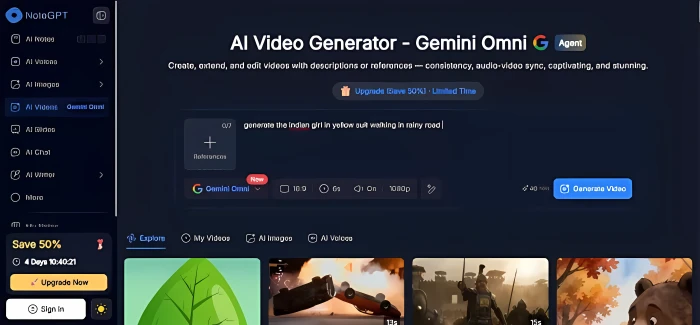
The video setup screen. Clicking Generate Video sent me to a login page instead of rendering anything.
Clicking Generate Video produced no video. It sent me to a login page instead. After creating an account and trying again, a full-screen subscription window appeared, telling me the month’s premium credits were insufficient and that I would need to buy more to continue. Not a single frame rendered during the entire test.
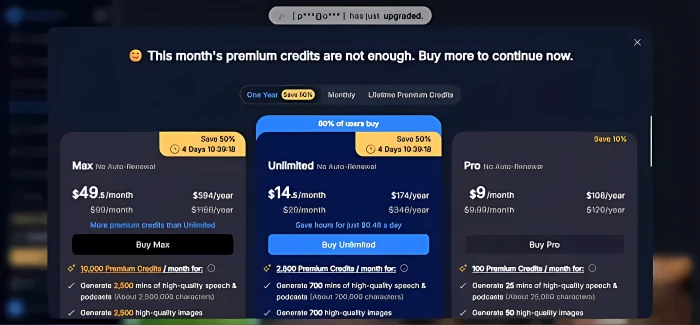
The wall you hit after logging in. Three plan cards, countdown badges, and a popup announcing someone else just upgraded.
In practical terms, video is not part of the free experience. And at 40 credits a clip, even a modest paid allowance would not stretch far, as the credit math below shows.
Pricing and credits, explained
The subscription wall I hit inside the video tool laid out three plans, all billed annually, each labeled “No Auto-Renewal”. Tabs at the top offered One Year (with the 50% discount), Monthly, and a Lifetime Premium Credits option. Here is what each card promised on the day:
| Plan | Discounted price | Listed regular price | Premium credits / month | What those credits buy |
|---|---|---|---|---|
| Pro | $9 per month $108 per year | $9.99 per month $120 per year | 100 | About 25 minutes of speech (roughly 25,000 characters) or 50 high-quality images |
Unlimited badged “80% of users buy” | $14.50 per month $174 per year | $29 per month $348 per year | 2,800 | About 700 minutes of speech (roughly 700,000 characters) or 700 high-quality images |
| Max | $49.50 per month $594 per year | $99 per month $1,188 per year | 10,000 | About 2,500 minutes of speech (roughly 2.5 million characters) or 2,500 high-quality images |
Two currencies, one confusing word
NoteGPT runs on two separate allowances, and understanding the difference explains most of the angry reviews. Basic quotas cover the summarizer side: transcripts, summaries, mind maps, translation, and chat with the standard models. Paid plans make these unlimited; free users get a small monthly allowance, reportedly around 15. Premium credits cover everything expensive to run: speech generation, image generation, video, agent-built slides, and chat with premium models. Premium credits are capped on every plan, including the one called Unlimited.
So “Unlimited” means unlimited basic quotas, not unlimited creative output. If you buy it expecting endless images or video, you will hit a credit wall, which is exactly what several reviewers describe.
The credit math
At 40 credits per six-second video, Pro’s 100 credits buy two clips a month. Unlimited’s 2,800 stretch to roughly 70 clips, and Max’s 10,000 to about 250, and that is only if you spend nothing on images or speech, which draw from the same pool. The company has also said in review replies that some newer image models consume more credits per generation than the standard ones, so the “50 images” figure on the Pro card is a ceiling rather than a guarantee.
| The prices move. When I revisited the pricing page in September 2026, the banner read “Save 30%” instead of 50%. Unlimited was listed at $19.92 a month ($239 a year) and Max at $69 a month ($829 a year), while the crossed-out “regular” prices of $29 and $99 were unchanged. The countdown timer, in other words, counts down to a smaller discount, not to full price. Treat every figure in this review as a snapshot and check the live page before buying. |
A small popup at the top of the subscription window announced that another user had just upgraded. Combined with the permanent timer on the dashboard and the “80% of users buy” badge, the effect is less a pricing page and more a set of pressure tactics. Refund terms are worth reading before you pay as well: third-party reviews have described the refund window as narrow and promotional purchases as non-refundable, so confirm the current policy on NoteGPT’s own site.
Beyond the creative tools: the summarizer side
I did not put the summarization features through the same paces, but they deserve a mention because they are what most satisfied users are actually paying for. The Chrome extension runs directly on YouTube and produces a structured summary, a timestamped transcript, AI notes, and a mind map without leaving the page. It handles videos that have no captions (up to about two hours on the extension, and up to 210 minutes per video on the top plan), translates transcripts into 40-plus languages, and downloads subtitles as TXT or SRT. Summaries can be pushed onward into slide decks, narrated podcasts, and flashcards.
The web app adds batch processing: you can paste up to 20 YouTube URLs at once, and the higher plans extend the same idea to whole channels and to uploaded audio or video files. The extension itself is free to install, with the monthly basic-quota allowance mentioned above.
Support runs through [email protected] and a Discord community. As the next section shows, reviewers are split on how responsive that support actually is.
What other users report
Public reviews of NoteGPT split fairly cleanly into two camps. On Trustpilot, at the time of testing, the company had 37 reviews averaging 3.0 stars, on a profile it claimed in March 2026. NoteGPT does reply publicly to complaints there, which is more than many small AI vendors manage, though the replies mostly restate that free tools exist and that higher limits cost money.

NoteGPT’s Trustpilot profile during testing: 37 reviews, 3.0 average.
The positive side
Satisfied users mostly talk about the summarization side of the product: quick summaries, transcript extraction, YouTube video summaries, note creation, and light content generation. Several say it helps them get through long videos faster, keep study material organized, and produce quick visuals from articles, PDFs, and other online content. One recent reviewer singled out the image generator for turning rough ideas into presentation and social media graphics without endless prompt tweaking, and another praised the text-to-speech tool as a good way to listen rather than read, while wishing for more control over tone.
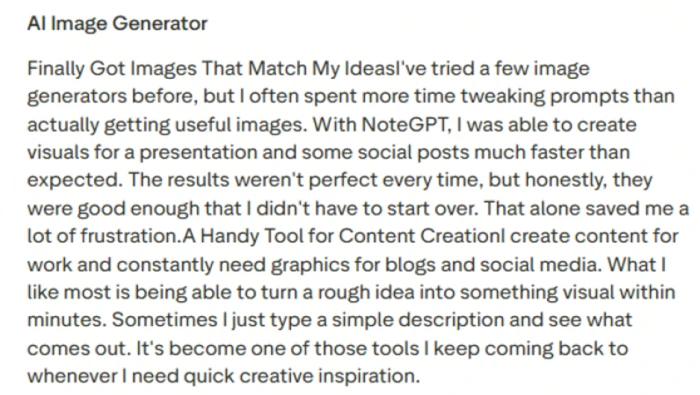
A representative positive review, focused on the image generator.
The complaints
Critical reviews cluster around three themes: reliability, support, and plan limits. Some paying customers report that the Unlimited plan threw an insufficient-quota error almost immediately after purchase. Others describe support emails that went unanswered for a week or more when a feature broke. One reviewer said image uploads looked as if they had completed but never actually worked, leaving them stuck mid-task. A March 2026 reviewer objected that the product was advertised as free but asked for $9 straight after signup.
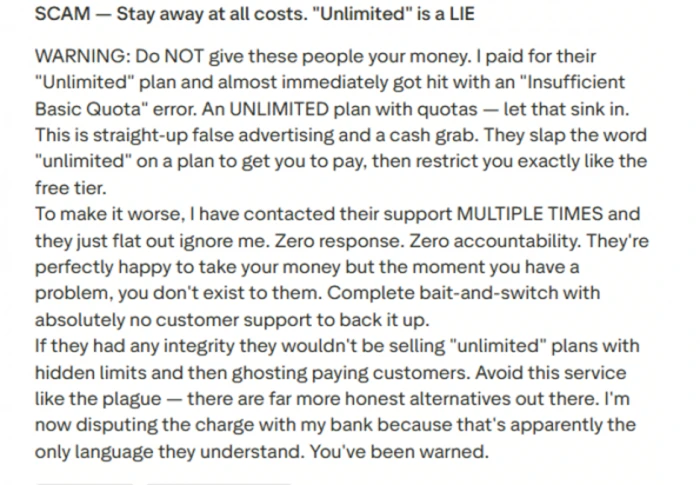
The most common complaint: quota errors on a plan called Unlimited.
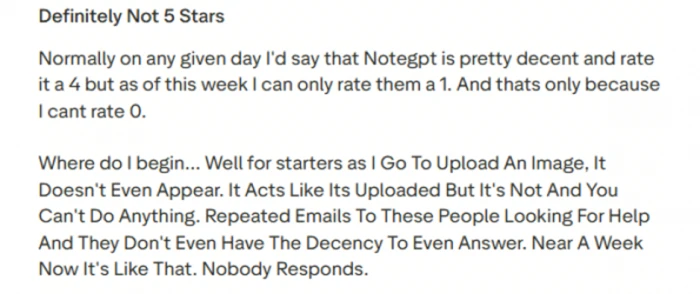
A second theme: features that silently fail, followed by silence from support.
Reading the pattern
Taken together, the feedback paints NoteGPT as a handy tool for students, researchers, creators, and professionals who mainly want fast summaries, transcripts, notes, and simple learning material. It also argues for caution before paying, particularly around premium-credit limits, support expectations, and feature reliability. It is better thought of as a convenient summarizer and creative helper than a finished all-in-one workspace.
If you only need one of the jobs NoteGPT bundles, it is worth knowing that dedicated tools exist for each: standalone YouTube summarizers, meeting note-takers with live transcription (which NoteGPT does not offer), and study apps with spaced repetition. I have not tested those here, but they come up constantly in comparisons, and a single-purpose tool is often cheaper than an all-in-one plan you only use a corner of.
Scorecard
| Area | Rating | Why |
|---|---|---|
| Image quality | Strong | Polished lighting and fine detail from the free GPT Image 2 output. |
| Speed | Excellent | Image and audio both generated in seconds. |
| Text to speech | Excellent | Natural default voice and generous export formats. |
| One-dashboard convenience | Strong | Summaries, images, video, voice, notes, and writing in one place. |
| Free tier honesty | Mixed | Real for images and voice, but previews are not saved and daily caps are tight. |
| Support | Mixed | Public replies on Trustpilot, but multiple reports of unanswered emails. |
| Video generation | Not testable free | Login wall, then a credits paywall, before any output. |
| Pricing transparency | Weak | Shifting discounts, a plan called Unlimited that is not, and credit math that burns quickly. |
Should you use it?
Give it a try if • You want decent AI images and voiceovers without juggling several tools. • You are happy to download each result the moment it appears. • You mostly need summaries, transcripts, and notes, which is where the positive reviews land. • You are comfortable sticking to the free tier and the Chrome extension. | Look elsewhere if • AI video is the main thing you are after. • Countdown timers and upgrade popups put you off. • You need dependable support or truly uncapped creative output on a paid plan. • You want live meeting transcription, which NoteGPT does not do. |
Final word
NoteGPT.io’s creative tools are quicker and better than I assumed a free product would be, especially for images and speech.
What holds it back is everything wrapped around them: a video feature you cannot try without paying, previews that disappear unless you act, a credit system that makes “Unlimited” mean something narrower than it sounds, and a sales approach that leans on urgency and a discount that quietly shrinks. If images, voice, and quick summaries are what you need, it is worth a look on the free tier. Keep a download folder open, read the credit table before you buy, and expect to be asked to upgrade often.
Pricing, credit costs, and usage caps reflect what the NoteGPT.io interface and public pricing page displayed on the dates noted and may have changed since. This review was produced independently and is not sponsored.