If you have ever stared at a 45-minute YouTube tutorial and wished someone would just tell you the three things that actually matter, you are the exact person Skipit.ai is built for. It promises instant summaries, unlimited questions, and support for videos up to 12 hours long.
But promises are easy. I signed up, paid attention to every screen, and ran real YouTube links through it to see whether the tool delivers or stumbles. Here is exactly what happened, what real users say on review sites, and which alternatives are worth a look if Skipit is not the right fit.
What Is Skipit.ai?
Skipit.ai is an AI-powered YouTube video summarizer. You paste a YouTube URL, and the AI reads the transcript, pulls out the key points, and lets you ask follow-up questions in a chat interface instead of scrubbing through the timeline yourself.
The tool supports videos up to 12 hours long and allows users to ask specific questions, receiving answers directly from the video transcript. Users can send unlimited queries and interact with the AI to receive specific information and answers from the video content.
It is positioned for three groups: students condensing long lectures, professionals cutting down training and webinar footage, and creators pulling outlines out of their own videos. On paper, it is a focused, single-purpose tool rather than a sprawling AI suite.
My Hands-On Test: Step by Step
Rather than trust the marketing copy, I walked through the product the way a first-time user would.
Step 1: The Landing Page
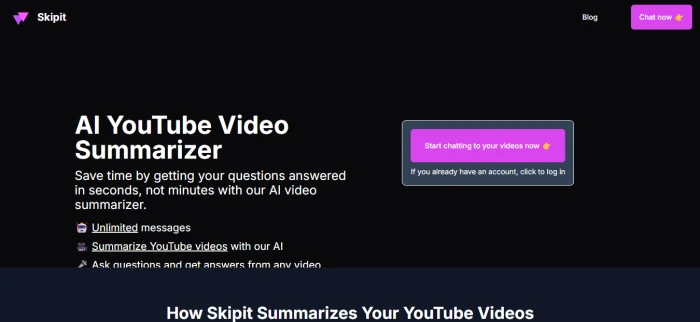
Searching for Skipit brings you to a clean, dark-themed landing page headlined “AI YouTube Video Summarizer.” The pitch is simple and benefit-led: save time by getting answers in seconds, not minutes. The three bullet points it leads with are unlimited messages, YouTube video summarization, and the ability to ask questions and get answers from any video.
First impression: the page is clear and uncluttered. There is no confusion about what the product does, which is more than a lot of AI tools can claim.
Step 2: Signing Up and the Paywall
Clicking “Chat now” does not drop you straight into a dashboard. It asks you to log in first. And immediately after logging in, before you ever reach the tool itself, you hit the pricing screen.
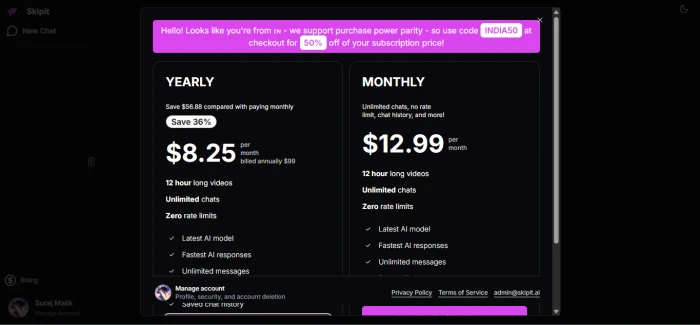
This is worth flagging clearly for anyone evaluating Skipit: the pricing wall is the first thing you see after authentication, not the product. The plans shown were:
| Plan | Price | Billing |
| Yearly | $8.25/month | Billed annually at $99 |
| Monthly | $12.99/month | Billed monthly |
The yearly plan is marketed as a 36% saving over monthly. Both tiers advertise 12-hour video support, unlimited chats, zero rate limits, the latest AI model, and saved chat history. There was also a region-based discount banner offering a purchase power parity code for 50% off, which is a nice touch for users outside high-income markets.
A note on pricing accuracy: listings around the web currently show Skipit’s yearly plan as low as $7.99/mo and monthly at $12.99/mo, so the exact annual number shifts slightly depending on promotions. Either way, this is a paid-first product. There is a freemium element, but the core experience sits behind a subscription. topai
Step 3: The First Real Test (And the First Error)
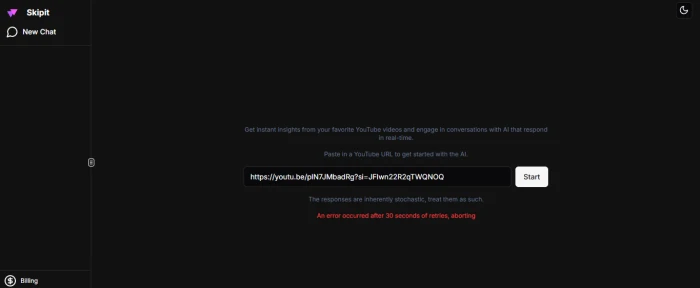
Once inside, the interface is minimal: a single field that says “Paste in a YouTube URL to get started with the AI,” a Start button, and a quiet disclaimer that responses are stochastic and should be treated as such.
I pasted in a standard YouTube link and clicked Start. After a pause, I got this:
“An error occurred after 30 seconds of retries, aborting.”
I tried again. Same result.
Step 4: Trying a Different Video
My first thought was that the video type might be the problem, so I switched to a different link, assuming educational or similar content might process more reliably. I pasted in a second YouTube URL and ran it.
Same error. “An error occurred after 30 seconds of retries, aborting.”
The Evaluation Problem
This is the honest heart of my review, and it is a point worth being transparent about: if the tool does not return a result, there is no output to evaluate.
I could not assess summary quality, accuracy, depth, or how well the Q&A chat handles follow-up questions, because the tool never got past the processing stage on the videos I tried. That does not automatically mean Skipit is broken for everyone. Transient failures happen for real reasons: a video without available captions or transcript, region or copyright restrictions on the specific video, temporary API or server load, or rate limits on the backend transcription service. The product itself even warns that responses are stochastic.
But from a pure user-first perspective, the experience I had was this: I paid attention, I followed the flow, I pasted valid links, and twice I hit a dead end before seeing a single summary. For a tool whose entire value is speed and reliability, failing silently after a login-and-paywall gauntlet is a meaningful friction point. If you try Skipit and hit the same wall, the most reliable fix is to test a well-known video that definitely has captions enabled, since missing transcripts are the single most common cause of this kind of error in summarizer tools.
What Real Users Say About Skipit.ai
My session hit a snag, but other users have gotten it working, and their feedback paints a more complete picture. The most substantive reviews live on G2.
Based on the current G2 profile, Skipit AI holds an average rating of 4.5 stars across 4 reviews. A broader aggregate elsewhere reports that based on 5 reviews, 80% of users recommend Skipit.ai, rating it highly for value for money.
Here is what reviewers actually highlight.
What users like:
One verified reviewer praised its ability to break down long material: Skipit AI breaks information down into easily digestible portions, making it easy to determine the important aspects, with summarization capabilities for different content types such as PDFs and YouTube videos. Another said they have come to rely on Skipit AI as their primary means of getting an overview of longer articles and research papers. A third noted the best use case was speeding up the ability to find out basic content in lengthy articles and published research.
On the aggregate side, users most often cite it being worth the price and delivering quality results.
What users dislike:
The criticism is consistent and important. One reviewer noted that Skipit AI appears to have a poor understanding of subtlety. Another said Skipit has difficulty understanding more complex or conceptual content. In the aggregate data, the main complaint from dissatisfied users was simply that it was not worth the price.
The honest takeaway from reviews: Skipit works well for surface-level extraction, getting the gist, finding basic facts, and condensing straightforward content. It struggles with nuance and abstract or conceptual material. That is a realistic expectation to set before you pay.
One caveat on the review data itself: several of the G2 reviews are marked as incentivized, and the total review count is small (4 to 5 reviews). That is a thin sample, so treat the ratings as directional rather than definitive.
Who Skipit.ai Is Actually For
Based on its design, pricing, and the user feedback, Skipit makes the most sense for:
- Students who need to compress long lectures or research into quick study notes and are fine with summary-level depth.
- Professionals turning multi-hour webinars and training videos into skimmable takeaways.
- Casual viewers who just want the gist of a long video before deciding whether to watch it in full.
It is a weaker fit if you need deep conceptual analysis, you are unwilling to commit to a subscription before testing output, or you want a free tool for occasional use.
Skipit.ai Alternatives Worth Considering
If Skipit does not work for you, whether because of the error I hit, the paywall-first flow, or the depth limitations users report, the YouTube summarizer space is crowded with strong options. Here are the main alternatives and what each does best.
NoteGPT is a lightweight, learning-focused platform that does more than YouTube. It can summarize individual YouTube videos, complete playlists, channels, uploaded video files, audio recordings, PDFs, presentations, and webpages, providing transcripts, structured summaries, translation, follow-up chat, and batch processing. It also supports videos without existing YouTube subtitles, though many unrelated writing and media tools are bundled into the same interface. A good pick if you want breadth and a free tier.
Eightify is a browser-extension approach rather than a separate website. It is a focused YouTube summarizer available through Chrome, Safari, iOS, and Android that places an AI summary directly inside the YouTube viewing experience with minimal configuration. It supports videos of varying lengths and offers summaries in more than 40 languages. Best for people who want summaries without leaving YouTube.
Monica is an all-in-one AI assistant rather than a dedicated summarizer. It is designed to enhance various tasks including summarization, writing, and coding, and works smoothly as a browser assistant, especially if you primarily process web content. It offers a free plan, with the Pro plan around $9.9/month. Best if you want one tool for many jobs, not just video.
HARPA AI is a broader browser-based assistant. It can summarize YouTube videos without requiring users to copy the transcript into a separate chatbot, with summaries appearing directly beside the video, though the broad platform is more complex than a dedicated summarizer. Best for power users who want summarization plus automation.
BibiGPT is built specifically for deep audio and video understanding. It specializes in deep audio/video understanding, supporting YouTube, Bilibili, and more, with mind maps, AI Q&A follow-ups, and highlight notes designed specifically for video content. Best if you want structured, visual breakdowns rather than plain text.
Summarize.tech is the no-frills option. It is well suited for summarizing long-form, in-depth YouTube videos in seconds. Best for a quick, free summary of a single long video with no account overhead.
| Tool | Best For | Pricing Model |
| Skipit.ai | Chat-based Q&A on long videos | Paid (7.99–12.99/mo) |
| NoteGPT | Multi-format summaries + playlists | Freemium |
| Eightify | In-browser YouTube summaries | Freemium |
| Monica | All-in-one AI assistant | Freemium ($9.9/mo Pro) |
| HARPA AI | Summaries + browser automation | Freemium |
| BibiGPT | Deep video analysis + mind maps | Freemium |
| Summarize.tech | Quick one-off long-video summaries | Free/Freemium |
The Verdict
Skipit.ai has a clear, well-designed pitch and a genuinely useful idea: turn long videos into a conversation. Real users confirm it does a solid job on straightforward content and rate it reasonably well for value, while being candid that it struggles with nuance and that not everyone feels it justifies the price.
My own test could not confirm summary quality, because I hit a processing error twice on valid YouTube links before seeing any output. Combined with a flow that puts login and a pricing wall ahead of the actual product, that is a friction point serious enough to mention up front.
My recommendation: if you want to try Skipit, test it on a well-known video with captions definitely enabled, and lean on the purchase power parity discount if it applies to you. But given that several alternatives offer free tiers and let you evaluate real output before paying, it is worth sampling a couple of those first so you can compare actual summaries rather than marketing claims.