

| Detail | Info |
|---|---|
| What it is | A free online text-to-speech (AI voice) generator |
| Access | Browser-based, no install, no account needed to start |
| Free tier | 1,000 characters shown per session, with per-voice conversion limits |
| Languages | 100+, including English, Spanish, Chinese, Japanese, German, French |
| Voices | Hundreds of neural AI voices across accents and genders |
| Commercial rights | Yes, 100% commercial usage on generated audio |
| Best suited to | Short voiceovers, YouTube narration, e-learning and multilingual clips |
What TTSMaker is, and why people reach for it
Most text-to-speech tools make you sign up, watch a free quota evaporate, or stamp a watermark on anything you export. TTSMaker takes the opposite route: you land on a page, paste your text, pick a voice, and download an audio file, with no login, no install, and full commercial rights to whatever you generate. For a free tool, that combination is unusual, and it is the main reason the name keeps surfacing in "best free TTS" threads.
Under the hood it runs on neural voice models, which is what gives the output its natural, human-ish intonation rather than the flat, robotic cadence older readers produce. It supports well over 100 languages and hundreds of voice styles, and it exports audio you can use in videos, podcasts, ads, or courseware. There is a paid Pro tier that lifts the limits and unlocks finer controls, but the free version is what most people actually touch, so that is exactly what I put through its paces below.
How I tested TTSMaker, step by step
Rather than take the marketing at face value, I ran a single sample paragraph through the entire flow, from a blank page to a downloaded file, and noted what happened at each stage. Here is the full walkthrough.
Step 1: The landing page
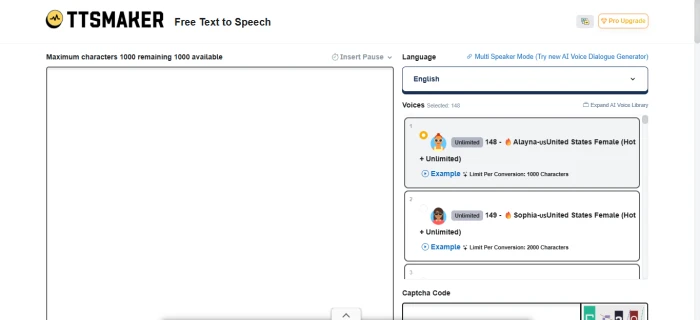
This is the page you drop onto. The left side is a large editor with a live counter reading "Maximum characters 1000 remaining 1000 available." On the right sit the language selector (English by default) and a scrollable list of voices such as Alayna-us and Sophia-us, with a captcha field waiting further down. Nothing blocks the editor, no pop-up, no "create an account to continue."
What stood out here is that there is no sign-up wall at all: you can start typing the second the page loads, and your 1,000-character free budget is displayed right at the top, so you always know how much room you have before you commit a word.
Step 2: Pasting text and the Insert Pause control
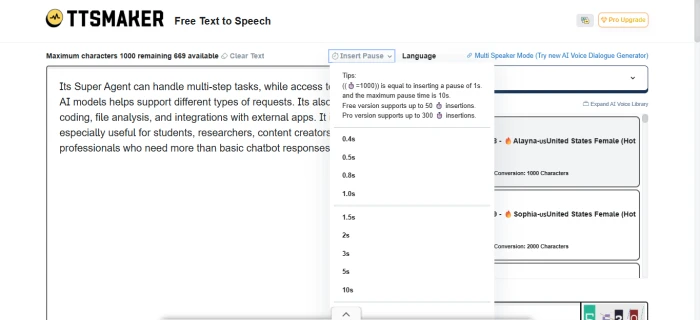
I pasted a short paragraph and the counter immediately dropped to "669 available," confirming it tracks usage in real time. I then opened the Insert Pause menu, which lets you drop timed silences anywhere in the text, from 0.4 seconds up to 10 seconds. A tip note explains the free version allows up to 50 pause insertions, while Pro stretches that to 300.
The pause tool is the feature that quietly lifts this above a basic reader: dropping timed breaks between sentences lets you control pacing and breathing in a voiceover, and 50 insertions is more than enough for most short scripts without ever paying.
Step 3: Choosing a language
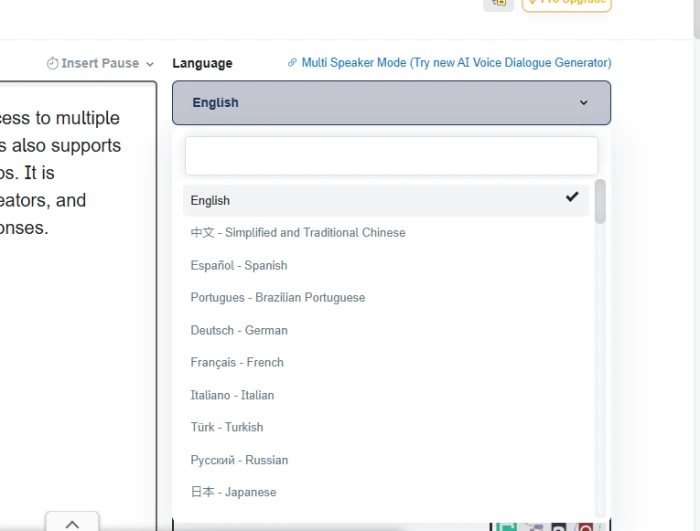
Opening the language selector reveals a searchable list: English (ticked), Simplified and Traditional Chinese, Spanish, Brazilian Portuguese, German, French, Italian, Turkish, Russian, Japanese, and more as you scroll.
Because the dropdown has its own search field, switching from English to Spanish or Japanese is a two-click job instead of a long scroll, a small touch, but one that genuinely matters if you produce multilingual content on any regular basis.
Step 4: Voices, captcha and settings
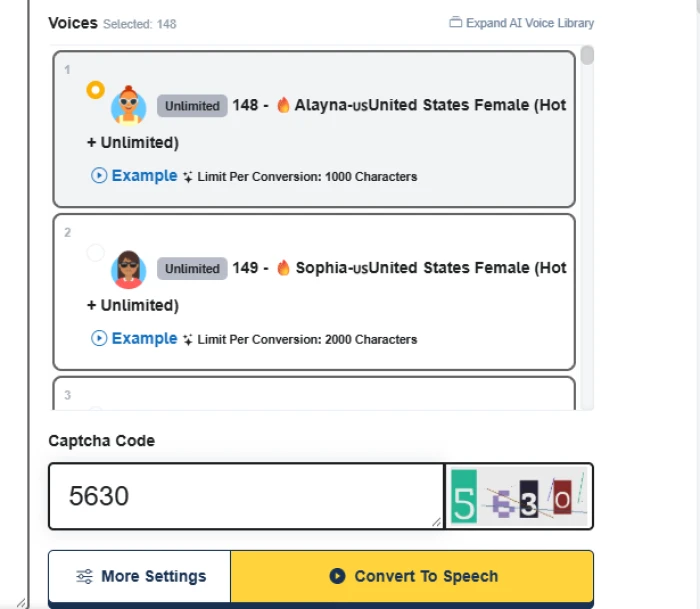
Here you pick a voice (I kept the default Alayna-us), type the captcha code shown beside the field, and choose between More Settings and the yellow Convert To Speech button. Each voice card carries its own details, including an example preview you can play before committing.
The detail worth catching is that every voice lists its own per-conversion character limit, with some at 1,000 and others at 2,000, so the ceiling changes with the voice rather than being one flat number, and it pays to read that before you choose.
Step 5: First-time human verification
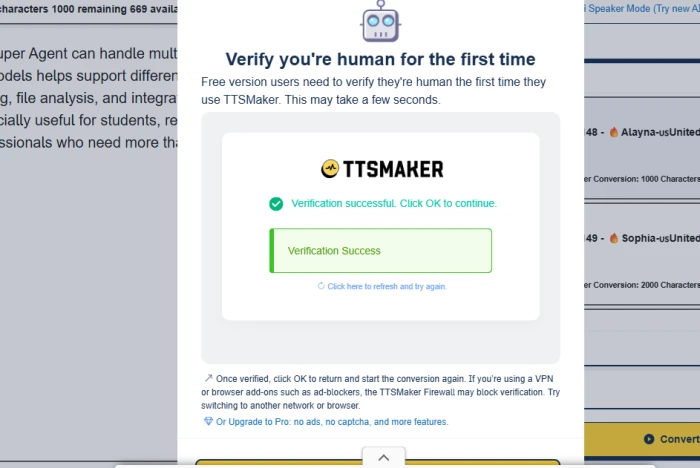
Clicking Convert triggered a "Verify you're human for the first time" pop-up. It resolved to "Verification successful" on its own, with a note that free users only need to clear this once, and that a VPN or ad-blocker can interfere with the check.
This gate is a one-time hurdle rather than something that nags you on every conversion, and it cleared in a couple of seconds for me, and the only thing to know is that a VPN or an aggressive ad-blocker is the most likely reason it would stall.
Step 6: The result and download
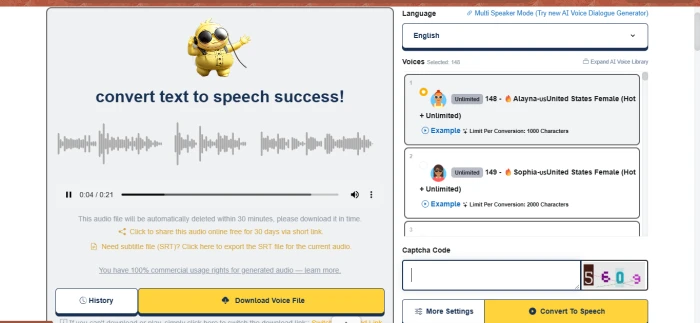
Within moments I got a "convert text to speech success!" screen with an inline player, and my 669-character clip ran about 21 seconds. Below it sat a 30-day share link, an SRT subtitle export, a line confirming 100% commercial usage rights, a History button, and a single Download Voice File button.
The output itself was clean and natural, the download was genuinely one click, and the extras, namely SRT subtitles, a shareable link, and commercial rights on a free tool, are the kind of thing creators actually use; the one catch is that the audio auto-deletes after about 30 minutes, so you want to grab the file straight away rather than leave the tab open.
What users actually say about TTSMaker
To balance my own run, here is the sentiment that recurs across review directories, tool round-ups, and community threads. Ratings on listing sites skew positive, with one AI-tools directory showing a 5.0 average across 34 votes, but those pools are small, so treat them as a rough snapshot rather than a verdict. The reviews below are a representative sampling of the themes that keep appearing, not quotes tied to specific named users.
What people like:

| Rating | Reviewer | What they said |
|---|---|---|
| ★★★★★ | Content creator | A genuinely free AI voice generator, fast to use and no cost to produce usable audio |
| ★★★★★ | Small business user | Used it for company voicemail; the voices are lifelike and sound like a real recording |
| ★★★★☆ | Study-notes maker | Free for personal use and better with long text than many tools stuck at a 2k limit |
| ★★★★★ | YouTuber | Big voice and language range, no sign-up, and the SRT export saves a separate captioning step |
Where it frustrates people:


| Rating | Reviewer | What they said |
|---|---|---|
| ★★★☆☆ | Budget user | Feels more freemium than free, where the best limits and controls sit behind the Pro plan |
| ★★☆☆☆ | Long-form narrator | Per-conversion character limits mean chopping big scripts into chunks |
| ★★☆☆☆ | First-time user | The captcha stalled behind a VPN until I switched networks |
| ★★★☆☆ | Power user | Limited pitch, speed and emotion control on the free tier, and audio deletes after 30 minutes |
The pattern is consistent: the generosity of the free tier wins people over, while the ceilings and the Pro-gated fine controls are where heavier users feel the pinch.
TTSMaker pros and cons
| Strengths | Trade-offs |
|---|---|
| Free to start, with no account or install | Per-conversion character limits on the free tier |
| 100+ languages and hundreds of neural voices | Fine controls (pitch, speed, emotion) lean on Pro |
| Natural, human-sounding output | Generated audio auto-deletes after about 30 minutes |
| Full commercial usage rights | First-use captcha can trip over VPNs or ad-blockers |
| One-click download plus SRT subtitle export | No word highlighting or reading-focus tools |
| Pause control for pacing (up to 50 free insertions) | Online only, needs a stable connection |
TTSMaker vs ElevenLabs
People often weigh these two against each other, but they are built for different jobs. TTSMaker leans toward fast, free, no-login conversions with commercial rights baked in; ElevenLabs leans toward studio-grade realism, voice cloning, and fine emotional control, with a smaller free quota. Neither is simply "better"; it depends on whether you want quick free output or premium polish.
| Feature | TTSMaker | ElevenLabs |
|---|---|---|
| Starting point | No sign-up needed to generate | Account required |
| Free allowance | Recurring free characters, per-voice caps | Monthly character quota |
| Voice realism | Natural neural voices | Top-tier, highly expressive |
| Voice cloning | Not a core feature | Yes, a headline feature |
| Commercial rights (free) | Yes, 100% | Allowed with attribution on free tier |
| Best for | Quick, free multilingual voiceovers | Premium, expressive, branded voice work |
How to get the best out of TTSMaker
A few habits make the free tier go a lot further:
• Preview before you spend. Play a voice's example clip first so you do not burn a conversion on the wrong voice.
• Watch the per-voice limit. Pick a voice whose character cap fits your script rather than assuming a single flat ceiling.
• Use pauses for pacing. Drop 0.4 to 1s breaks between sentences to stop the delivery sounding rushed.
• Download immediately. The audio is deleted after about 30 minutes, so save it the moment it is ready.
• Grab the SRT if you need captions. Exporting subtitles at the same time saves a separate transcription step.
• Turn off the VPN if verification stalls. The first-use human check is the one place a VPN or ad-blocker tends to get in the way.
• Split long scripts. For anything beyond the limit, break the text into parts and stitch the audio together afterward.
Verdict: is TTSMaker worth using?
For short voiceovers, narration, e-learning clips, and quick multilingual audio, TTSMaker is an easy yes. It does the core job well, with clean neural voices, a huge language list, subtitle export, and commercial rights, without forcing you through a sign-up or a watermark. The friction points are the predictable ones for a free product.
| Reassuring | Worth knowing |
|---|---|
| Free, no account, and full commercial rights | Free tier has per-conversion character limits |
| Natural voices across 100+ languages | Pitch, speed and emotion controls favour Pro |
| One-click download plus SRT subtitles | Audio auto-deletes after about 30 minutes |
| Pacing control via timed pauses | Online only, and a one-time captcha on first use |
So the honest answer is yes, with conditions. If you are producing short-to-medium audio and want a free tool that hands you a usable, downloadable file in under a minute, TTSMaker is one of the strongest options around. If you need long-form narration, voice cloning, or deep emotional control, you will eventually bump into its ceilings and start eyeing the Pro plan.