Why look past Writeless?
Writeless.ai built a following with a simple promise: type a prompt, pick a citation style, and get a full academic essay complete with real in-text citations in MLA, APA, Chicago, Harvard, or Vancouver in seconds. It is genuinely cheap (paid plans start around $9.99/month billed annually) and handles up to 20,000 words per essay.
The catch is twofold. First, Writeless does essentially one thing generate essays so it struggles the moment you need to refine your own writing, manage sources across a long project, or work in another language. Second, a core part of its marketing is helping work “bypass AI detection,” which pushes it into territory many schools and journals explicitly restrict. For most students and researchers, a tool that helps you write and think better is a safer long-term bet than one built to hide that AI was involved.
The five alternatives below each outperform Writeless on at least one axis that matters: quality of assistance, source handling, breadth of features, multilingual support, or everyday polish.
How these tools were evaluated
Each tool is scored on five practical criteria: quality of writing help, citation & source accuracy, originality and editing control, feature breadth, and pricing & free tier. Prices and limits were checked against each vendor’s official pricing page and public review platforms in 2026; ratings are approximate averages drawn from those platforms.
Quick picks: the right tool for you
| Category | Winner | Why |
| Best overall | Jenni AI | Writes alongside you with inline citations instead of replacing you. |
| Best value | QuillBot | A full paraphrasing + grammar + citation suite from ~$8.33/mo. |
| Best for research | Paperpal | Academic editing tuned for journal submission and real references. |
| Best all-in-one | Smodin | Essay writer, checker, translator & more across 50+ languages. |
| Best everyday | Grammarly | Polishes everything you write, everywhere you write it. |
| Free tier | All five | Every tool offers a usable free plan test before you pay. |
Side-by-side comparison
Writeless is included as the baseline so you can see exactly where each alternative pulls ahead.
| Tool | Best for | Free plan | Starting paid price | Standout feature | Rating |
| Writeless (baseline) | Fast essay drafts | Preview only | $9.99/mo (annual) | One-click cited essays | 4.2 |
| Jenni AI | Drafting with citations | Yes (daily limit) | $12/mo (annual) | Inline AI autocomplete | 4.4 |
| QuillBot | Paraphrasing & polish | Yes (125-word cap) | $8.33/mo (annual) | 9 paraphrasing modes | 4.5 |
| Paperpal | Research & submission | Yes (200/mo) | $11.58/mo (annual) | Pre-submission checks | 4.2 |
| Smodin | All-in-one toolkit | Yes (3/day) | ~$10/mo (Essentials) | 50+ language support | 4.1 |
| Grammarly | Everyday writing polish | Yes (100 AI/mo) | $12/mo (annual) | Works in 1M+ apps | 4.6 |
What you will actually pay per month
Lowest paid tier compared across billing options (USD). Every alternative sits in the same budget band as Writeless (roughly $8–$12/month) and QuillBot is actually cheaper.
| Tool | Annual billing (per month) | Billed monthly |
| QuillBot | $8.33 | $19.95 |
| Writeless (baseline) | $9.99 | $24.99 |
| Smodin | ~$10.00 | ~$15.00 |
| Paperpal | $11.58 | $25.00 |
| Jenni AI | $12.00 | $20.00 |
| Grammarly | $12.00 | $30.00 |
1. Jenni AI - Best overall alternative

Rating: 4.4/5 | Website: jenni.ai
The Jenni AI website and writing workspace.
Where Writeless hands you a finished essay, Jenni AI is built to write with you. Its signature feature is inline autocomplete: as you type, it suggests the next sentence in your flow, which you accept, edit, or ignore. The result stays in your voice while moving much faster a more defensible model than full generation. Founded in 2018, it is one of the longest-running tools in the space, used by over three million students and researchers.
Pricing: Free ($0, ~10 AI autocompletes/day) • Plus $12/mo annual ($20 monthly) • Pro $29/mo unlimited.
Key features
- AI autocomplete that continues your sentence in an academic register
- Real in-text citations in 2,600+ styles, pulled from sources and your own PDFs
- Upload PDFs and chat with your research library
- Outline builder, paraphrasing, and AI editing commands
Strengths
- Autocomplete is tuned for scholarly prose, so suggestions land in the right tone rather than generic filler
- Inline citations trace back to the actual source and your uploaded PDFs a rare, genuinely useful workflow
- Running since 2018 with 3M+ users: the most mature, battle-tested option here
Trade-offs
- Free plan is capped at roughly 10 AI autocompletes a day a demo, not enough to draft a paper
- Free exports include body text only and leave your citations behind
- No built-in plagiarism checker or AI detector, despite the academic focus
Best for: students and researchers who want to write a better paper faster not skip writing it. The inline model makes it the most useful and the most responsible pick here.
2. QuillBot - Best value
Rating: 4.5/5 | Website: quillbot.com
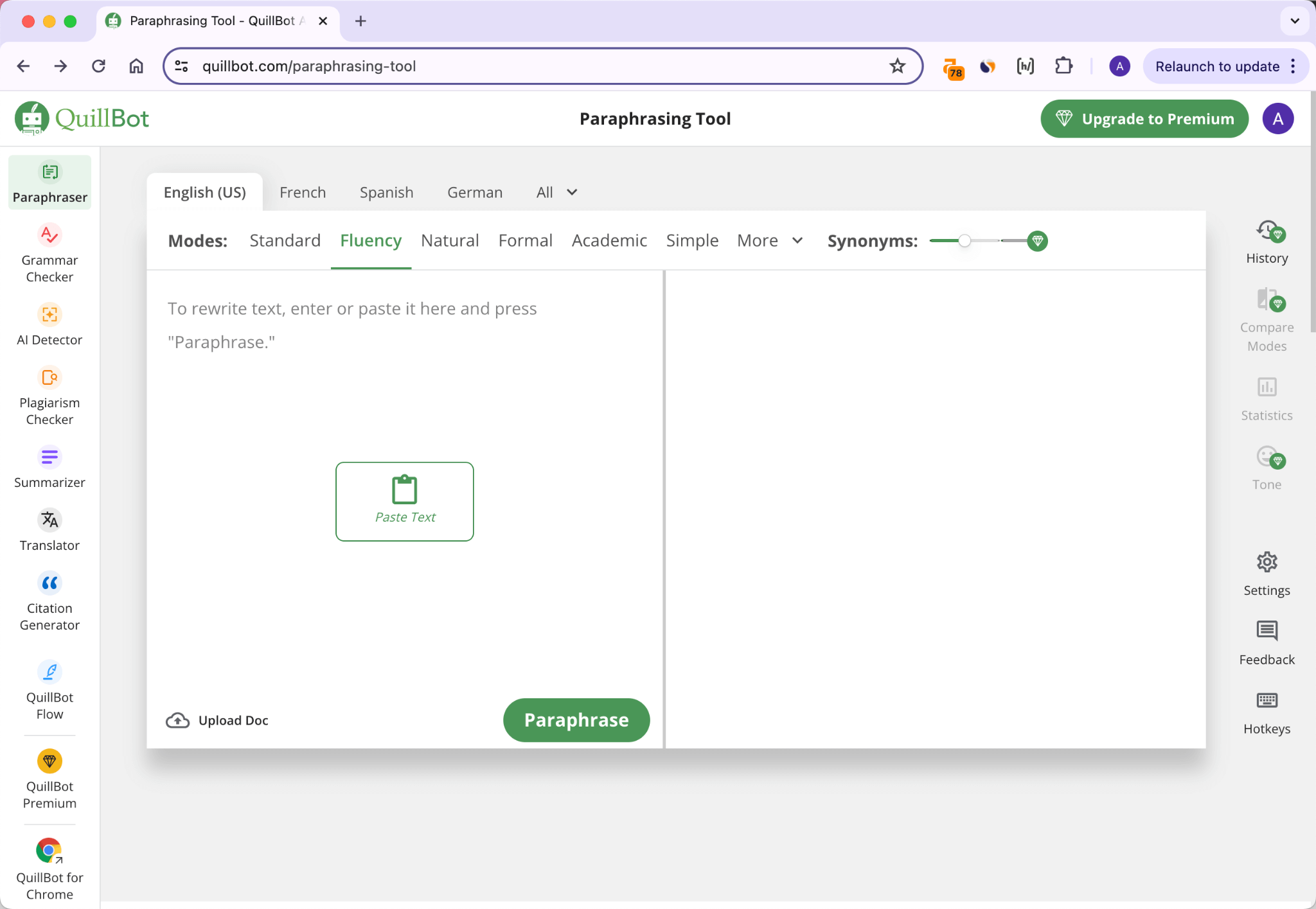
The QuillBot website and paraphrasing workspace.
QuillBot approaches the problem from the opposite end: instead of generating essays, it helps you improve text you already have. Its paraphraser the tool it is famous for rewrites your writing for clarity, fluency, or a more academic register across nine modes. Around that sits a surprisingly complete suite: grammar checker, summarizer, plagiarism checker, citation generator, AI detector, and translator, all for one of the lowest prices in the category.
Pricing: Free ($0, 125-word paraphraser, 2 modes) • Premium $8.33/mo annual ($19.95 monthly).
Key features
- 9 paraphrasing modes incl. a dedicated Academic mode for scholarly tone
- Plagiarism checker (25,000 words/month on Premium)
- Free citation generator in 1,000+ styles (APA, MLA, Chicago)
- Lives in MS Word, browsers, desktop & mobile; supports 23 languages
Strengths
- Its Academic paraphrasing mode rewrites in a scholarly voice not just “fluent” which is ideal for tightening essays
- Citation generator, AI detector and translator are completely free, even without Premium
- Cheapest full suite here at ~$100/year, and it embeds directly into Word and your browser
Trade-offs
- It refines existing text it will not produce an essay from a blank page
- Free paraphraser stops at 125 words (about a paragraph) and unlocks only 2 of 9 modes
- The plagiarism checker is locked behind Premium
Best for: writers on a budget who draft their own work and want an affordable, do-everything assistant to refine, cite, and check it.
3. Paperpal - Best for serious research
Rating: 4.2/5 | Website: paperpal.com
The Paperpal website and academic writing workspace.
Paperpal is the specialist of the group. Built by Cactus Communications on more than two decades of scientific and academic editing experience, it is tuned specifically for scholarly prose not marketing copy or casual email. Beyond editing, it finds references across 250M+ research articles, cites in 10,000+ styles, and runs pre-submission checks designed to reduce desk rejections. If your end goal is a journal manuscript or a thesis, this is the tool that speaks your language.
Pricing: Free ($0, 200 edits/mo, 5 AI uses/day) • Prime $11.58/mo annual ($25 monthly).
Key features
- Academic-grade language editing with discipline-aware suggestions
- Reference finder across 250M+ papers; citations in 10,000+ styles
- Plagiarism check, consistency checks & submission-readiness report
- Free add-ins for MS Word, Google Docs & Overleaf
Strengths
- Edits with 20+ years of journal/STM editing behind it, catching conventions general tools miss
- Finds real references across 250M+ papers and formats them in 10,000+ styles
- 30+ pre-submission checks surface issues before a reviewer ever sees them
Trade-offs
- Tuned for formal research too stiff for blogs, emails or marketing copy
- Free plan’s 200 monthly edits and 5 daily AI uses evaporate on a full manuscript
- At $25, its month-to-month price is the steepest in this lineup
Best for: graduate students, PhDs, and researchers preparing papers for publication who need accuracy and polish over speed.
4. Smodin - Best all-in-one & multilingual

Rating: 4.1/5 | Website: smodin.io
The Smodin website and all-in-one writing workspace.
Smodin is the closest feature-for-feature match to Writeless, but with far more range. It started as a multilingual rewriting tool and grew into a complete workspace: an AI essay writer, content detector, humanizer, plagiarism checker, auto-citation machine, summarizer, translator, an AI grader that scores your essay, and “Omni,” a research chatbot with live web search. Used by over ten million students, its real edge is breadth plus language coverage it works across 50+ languages, making it a strong pick for international students.
Pricing: Free ($0, 3 entries/day) • Essentials from about $10/mo • Top tier about $29/mo (everything).
Key features
- AI essay & research-paper writer with structured output
- Plagiarism checker with Google Scholar access on higher tiers
- AI detector, humanizer, summarizer, translator & AI grader in one place
- Broad multilingual support (50+ languages) plus Chrome extension & API
Strengths
- Genuinely all-in-one: writer, detector, humanizer, plagiarism, grader and the Omni research chatbot under one login
- Plagiarism checks can scan Google Scholar on higher tiers useful for academic originality
- Works in 50+ languages, the strongest multilingual fit for international students
Trade-offs
- Covers everything but masters little each tool trails a dedicated specialist
- A single shared credit pool feeds every feature, so heavy use drains it fast
- Free tier is capped at just 3 entries a day
Best for: students who want a single affordable toolkit for the whole workflow and multilingual writers who need to work beyond English.
5. Grammarly - Best for everyday writing
Rating: 4.6/5 | Website: grammarly.com
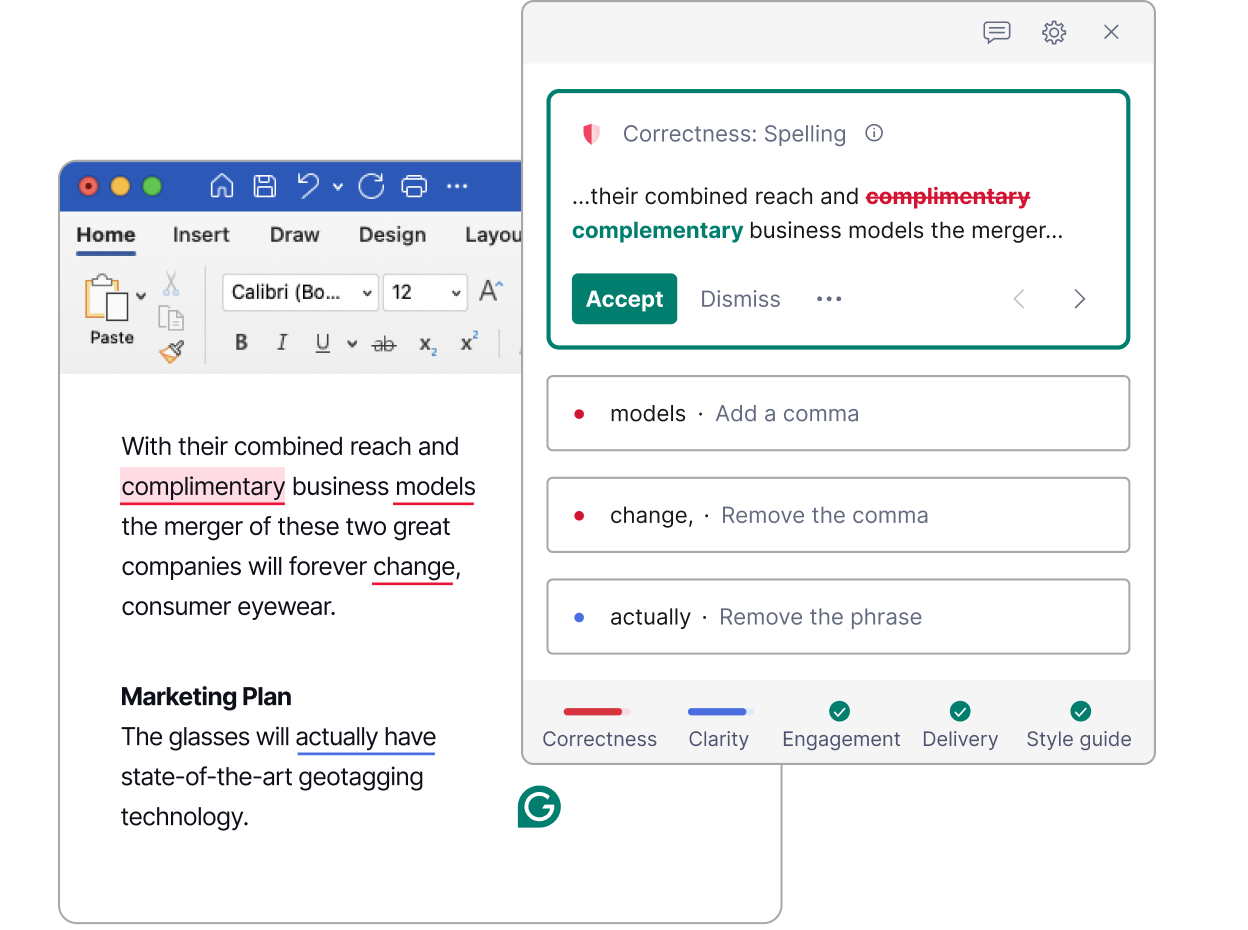
The Grammarly website and writing workspace.
Grammarly is the most mainstream and most trusted name here and it has evolved well beyond grammar fixing. Its free tier handles spelling, grammar, punctuation, and tone, while Pro adds full-sentence rewrites, generative AI (2,000 prompts/month), plagiarism detection, citations, and AI-writing detection. Its killer advantage is ubiquity: it follows you into your browser, email, documents, and more than a million apps and sites, so every piece of writing you produce gets the same polish without copy-pasting anything.
Pricing: Free ($0, 100 AI prompts/mo) • Pro $12/mo annual ($30 monthly) • Enterprise custom.
Key features
- Real-time grammar, clarity & tone feedback as you type
- Generative AI rewrites, tone shifts & drafting (2,000 prompts/mo on Pro)
- Plagiarism detection, citation help & AI-writing flagging
- Integrates everywhere browser, desktop, mobile, Office & Google Docs
Strengths
- The most accurate real-time grammar, clarity and tone engine of the five
- Follows you into 1M+ apps and sites browser, Office, Docs and mobile so nothing needs copy-pasting
- Free plan already bundles 100 AI prompts/month plus full corrections
Trade-offs
- Built to fix and refine writing, not to generate long-form essays from scratch
- Citation depth is thin next to Paperpal’s 10,000+ styles and reference finder
- $30 month-to-month is hard to justify for the AI features alone
Best for: anyone who writes across many contexts essays, emails, applications, posts and wants one assistant quietly improving all of it.
Head-to-head: the differences that matter
Most “best tools” lists stop at individual reviews. But the real question is usually “which of these two?” Here are the four match-ups readers run into most and the single line that decides each.
Jenni AI vs QuillBot
Generate a draft, or rewrite the one you already wrote? This is the core philosophical split between the two.
| Jenni AI | QuillBot | |
| Core approach | Writes & continues your draft | Rewrites text you already have |
| Best at | First drafts + inline citations | Paraphrasing & tightening prose |
| Citations | 2,600+ styles, auto in-text | 1,000+ styles, manual generator |
| Entry price | $12/mo (annual) | $8.33/mo (annual) |
| Weak spot | Thin free tier (~10/day) | Can not write from scratch |
Bottom line: they are complements more than rivals. Draft in Jenni, then run the result through QuillBot to vary and polish the language. Forced to pick one: Jenni if you need words on the page, QuillBot if you already have them.
Paperpal vs Grammarly
The academic specialist against the everyday all-rounder a common dilemma for students who also write a lot of email.
| Paperpal | Grammarly | |
| Built for | Academic & journal writing | All writing, everywhere |
| Editing style | Scholarly / STM-aware | General clarity & tone |
| Reach | Word, Docs, Overleaf | Browser + 1M+ apps |
| Citations | 10,000+ styles, 250M+ papers | Basic citation help |
| Entry price | $11.58/mo (annual) | $12/mo (annual) |
Bottom line: writing a thesis or manuscript for submission → Paperpal. Writing across essays, email and the web all day → Grammarly. Many researchers quietly run both.
Smodin vs Writeless
The closest direct comparison both generate essays at a similar price, so what actually separates them?
| Smodin | Writeless | |
| Scope | Full suite: writer, checker, translator, grader | Essay generation only |
| Languages | 50+ | Primarily English |
| Free tier | 3 entries/day (usable) | Preview only (can not edit output) |
| Entry price | ~$10/mo | $9.99/mo (annual) |
| Ceiling | Grows with your needs | You outgrow it fast |
Bottom line: same price band, far more range. For anyone currently on Writeless, Smodin is the natural upgrade you keep the one-click essay writing and gain a checker, translator and grader on top.
QuillBot vs Grammarly
The two editing heavyweights. Both improve your writing but they are built around different jobs.
| QuillBot | Grammarly | |
| Core strength | Paraphrasing & rewriting | Grammar, clarity & tone |
| AI generation | Limited | 2,000 AI prompts/mo (Pro) |
| Free plan | 125-word paraphraser | Full corrections + 100 AI/mo |
| Entry price | $8.33/mo | $12/mo |
| Pick it if… | You rephrase a lot / write in ESL | You want polish in every app |
Bottom line: QuillBot reshapes sentences; Grammarly perfects them. Heavy paraphrasers and ESL writers save money with QuillBot; everyone else gets more day-to-day value from Grammarly’s reach.
A quick, honest note on using these well
Several tools in this space advertise content that “bypasses AI detection.” It is worth being clear-eyed: AI detectors are unreliable and frequently flag human writing, so no tool can truly guarantee this and most schools and journals now have explicit AI policies, which can range from allowed with disclosure to prohibited. Check yours before you rely on any of these.
The durable win is treating AI as an assistant you direct and verify, not a ghostwriter: use it to brainstorm angles, structure an argument, format citations, tighten your prose, and learn from the edits. That is how you get a better grade and a better writer out of the deal.
How to choose in 30 seconds
| If you… | Pick | Why |
| Want to draft faster, in your own voice | Jenni AI | Inline autocomplete plus citations keeps you in the driver’s seat. |
| Are on a tight budget | QuillBot | A full paraphrase-and-check suite from ~$8.33/mo, with free tools on top. |
| Are writing a thesis or journal paper | Paperpal | Academic-grade editing, real references, and submission checks. |
| Want one tool for everything | Smodin | Writer, checker, translator, and grader across 50+ languages. |
| Write across lots of apps daily | Grammarly | Polishes everything, everywhere, with the most reliable editing. |
| Only need the odd quick essay draft | Writeless | Still fine for its one trick but you will outgrow it quickly. |
The bottom line: which should you pick?
Writeless is fast and cheap, but it is a one-trick tool wrapped around a risky promise. For most people, Jenni AI is the best all-round replacement it helps you write a real paper faster without pretending you did not. If you are counting pennies, QuillBot delivers the most capability per dollar. Researchers should head straight to Paperpal; multilingual and all-in-one users to Smodin; and anyone who just wants cleaner writing everywhere to Grammarly.
Every one of them has a free tier. Pick the two that fit your situation, test them on your next assignment, and keep the one that makes your writing better.