Answers at a glance
Q1 Can I use it without an account? Yes | Q2 Is the writing any good? Better than expected |
Q3 What does free really cost me? Ads, and a timer | Q4 Is it fast? Very |
Q5 Where does it start asking for money? At images | Q6 What is inside the free Pro trial? 30 days, 15k tokens, 15 images |
Q7 Does image generation work? Not reliably | Q8 What do the paid plans cost? $9.99 to $39.99 |
ToolBaz sells itself as a free AI writer with more than ninety tools. That claim raises obvious questions: free for whom, for how long, and how good is the output. Here is what I found when I put each one to the site.
Can I use it without an account?
Screenshot 1

The home page as it loads. Search on top, tools grouped below, one Try Pro button in the corner.
Completely. The home page drops you onto a search bar and a categorised list of tools, and clicking any of them opens a working generator. There is no email gate, no cookie-wall bargaining, no "create a free account to continue". I picked the AI Blog Writer, the first tool in the Article and Content Writer group. Its page is a text box for the topic, a link that fills in a random prompt if you are stuck, a model selector that defaulted to ToolBaz V5, and a folded Advanced Options panel. The right-hand column lists the neighbouring tools, so you can hop to the Paragraph Expander or the AI Content Generator without going back to the home page. Worth noting. The model selector is unusual for a free tool. Most competitors never tell you what is generating your text; ToolBaz names it and lets you switch. The site's own description says its tools draw on models including GPT-5, Claude and Gemini, though the picker labelled mine ToolBaz V5. |
Screenshot 2
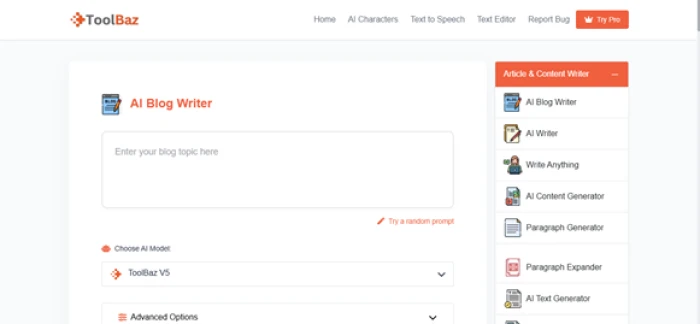
The AI Blog Writer, ready to go without signing in.
Is the writing any good?
Screenshot 3
The generated article, narration paused mid-read. Headings, bold phrases and an italicised film reference all came out formatted.
I gave it a topic about black holes and time travel. What came back was an article with a title, "Are Black Holes Real Time Travel Machines? Fact vs. Fiction", an opening hook, a bolded question, a one-line answer, and then proper sectioned headings such as "How Black Holes Warp Time (Einstein Was Right)". It ran to 821 words. Above the output are four buttons: copy, play, edit and download. Play is the one that surprised me. It reads the entire article aloud in a voice that sounds like a person rather than a dictation engine, at a pace you can follow. I have paid for standalone tools that do this worse. The same voice engine is available on its own as the Text to Speech AI tool. Is it publishable as-is? No, and nothing generated is. As a structured first draft you would rework, it is a genuine head start. |
What does free really cost me? Ads, and a timer
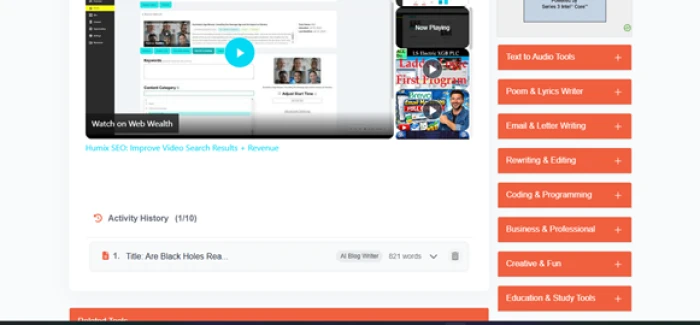
Attention. Scroll below any output and the next thing on the page is a large embedded video ad with a play button. It occupies more of the screen than the panel underneath it, which is your Activity History. That history is a quiet strength. It kept my article as entry one of ten, labelled with the tool and the word count, with controls to expand or delete it, and it did this without an account. Ten slots is enough to hold a working session. The other cost is time. The pricing page lists "no wait countdown" as a paid benefit, which tells you the free tier can make you wait between generations when it is busy. I did not hit the timer during my session, but public reviews mention it often enough to treat it as real. |
Screenshot 4
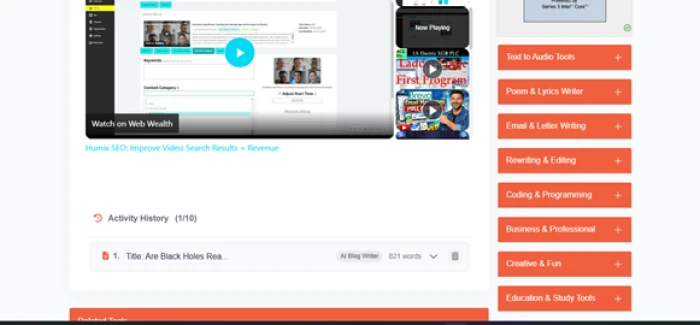
The ad, then the history. The sidebar shows the full category list: audio, poems and lyrics, email, rewriting, coding, business, creative, and study tools.
Is it fast?
Screenshot 5
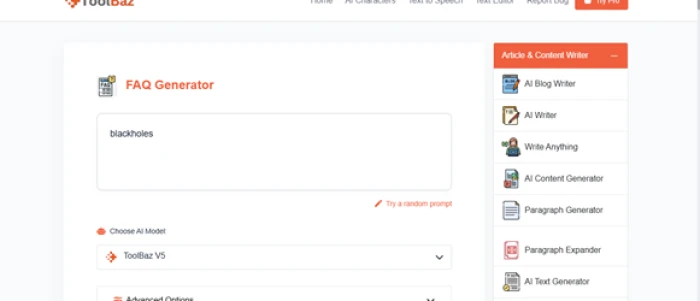
Same topic, different tool.
Screenshot 6
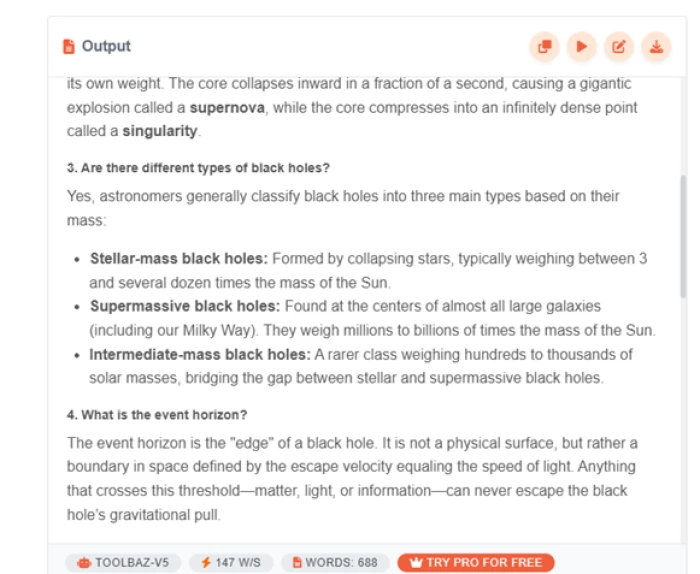
The FAQ output, with the speed and word count in the footer bar.
To measure this on something comparable, I opened the FAQ Generator and typed the same subject, black holes. The page is a clone of the blog writer's layout, so there was nothing new to learn. The answer streamed in faster than I could read it. The footer of the output panel reports the numbers: ToolBaz V5, 147 words per second, 688 words in total. The content was a numbered list of questions with clear answers, bold terms like supernova and singularity, and bullet points where they helped, for instance the three classes of black hole by mass. If you write support pages or landing-page FAQs, this one tool is reason enough to keep the site bookmarked. |
Where does it start asking for money?
Not where I expected. From the free tools, the Try Pro buttons do not open a price list; they open a free trial offer. I went looking for the cost and could not find it until I was already inside the Pro area. That is a deliberate funnel, and it worked on me. The first hard stop came in Pro's Text to Image tool (the free site has a separate AI Image Generator page, but the Pro version is where the long-prompt test happened). I pasted a long prompt describing a photorealistic black hole with an accretion disk and gravitational lensing, pressed generate, and was told to log in first. The result pane stayed a grey placeholder. So the writing tools never ask for an account; images do. If you only came for text, you may never see the wall at all. |
Screenshot 7
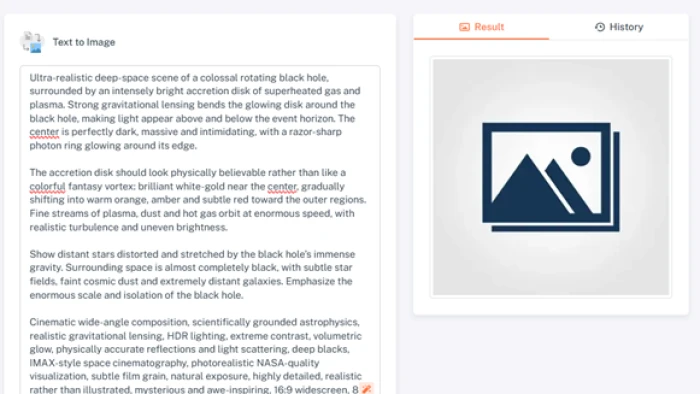
The long prompt loaded, the result pane empty, and a login request on the way.
What is inside the free Pro trial?
Screenshot 8
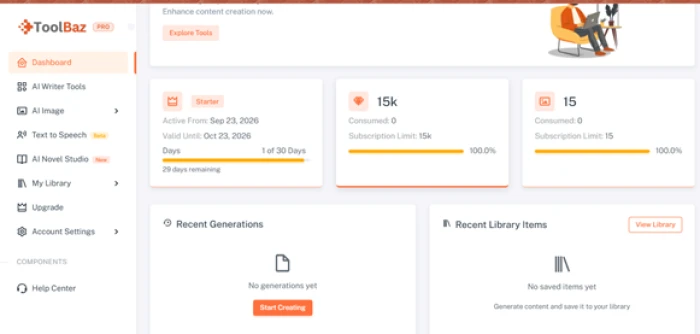
The Starter dashboard on day one. Nothing hidden: days, tokens and images are all counted on screen.
Logging in lands you on a dashboard that answers this in three cards. The plan is called Starter, active from September 23 to October 23, 2026, day one of thirty. The allowance is 15,000 tokens and 15 image generations, both untouched at the start, with progress bars for each. The left menu lays out the Pro feature set: AI Writer Tools, AI Image, Text to Speech (labelled Beta), AI Novel Studio (labelled New), My Library, Upgrade, Account Settings and a Help Center. Recent Generations and Recent Library Items were empty, with a Start Creating button. Scale check. Tokens are the units that large language models count text in, roughly three quarters of a word each. The cheapest paid plan includes 500,000 tokens a month. The trial's 15,000 is about three percent of that. It is enough to judge the paid tier, not enough to work from. |
Does image generation work?
Screenshot 9
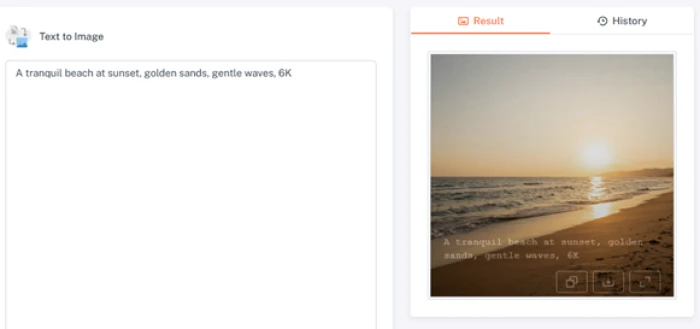
The example prompt succeeded, with the prompt itself rendered across the sand.
With the account live, I tried the black hole prompt again. It errored. I retried, and it errored again, every time. So I fell back to one of the site's own example prompts, "A tranquil beach at sunset, golden sands, gentle waves, 6K", and that rendered on the first go. The beach picture is a competent stock-style image, but look at the bottom edge of it: the prompt text has been printed into the image in a typewriter font. Nothing on the dashboard explains whether that is a trial watermark or the model rendering the words it was given. Either way the image is not usable without cropping. The pattern is clear, and it is the opposite of how the better text-to-image models behave. Short, generic prompts work; long, specific ones fail. If images are your reason to pay, run your own prompts through the trial before you commit. |
What do the paid plans cost?
Three tiers. Standard is $9.99 a month for 200 image credits and 500,000 tokens, roughly 375,000 words. Premium, flagged Most Popular, is $19.99 for 400 image credits and one million tokens, roughly 750,000 words. Ultra is $39.99 for 800 image credits and three million tokens, roughly 2.25 million words. Every tier includes the same 90-plus writing tools and the no-wait-countdown perk. So the money buys you two things: freedom from ads and timers, and volume. Nothing about the writing tools themselves changes as you go up. For a writer, that makes Standard the only plan worth considering. The higher tiers are for people generating images or long-form content at scale. If you do subscribe and change your mind, the terms are set out in the site's cancellation and refund policy. |
Screenshot 10
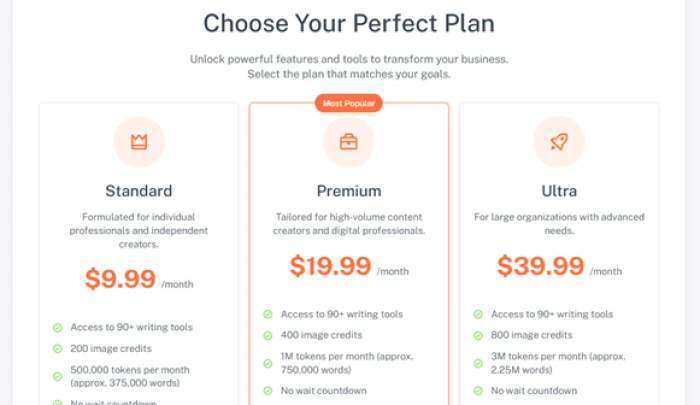
The pricing page as displayed in September 2026.
What everyone else thinks ToolBaz has been around long enough to collect public opinions, and they are sharply divided by which version of the site people used.
Scores read in September 2026. My own session matched the complaints about ads and the praise for speed; I did not hit a CAPTCHA problem. |
Real reviews
Summarised in my words from public review pages, with the reviewer's own phrasing kept only where it says something a summary cannot. Positive, mixed and negative are my reading of each review's overall tone.
Trustpilot, toolbaz.com Negative A user of less than a year says the site now pauses every few seconds and throws a "try again" pop-up on every prompt in the AI generator, and that this had been going on for about two weeks when they wrote it. | Trustpilot, toolbaz.com Positive Someone who uses it to ask how-to questions about software finds ToolBaz gives the most accurate answers of the free sites they have tried. They rate story generation poorly across all AI tools, but find it handy for grammar and for spotting differences between international spellings. |
Trustpilot, toolbaz.com Mixed A reviewer who enjoys the site overall lists the same problems as everyone else, saying that “the ads can throw you off” and that the models sometimes underperform or do not generate at all, while concluding it is still worth using. | Trustpilot, toolbaz.com Negative A long-time user says the free tools used to be unlimited and are now capped at 150 prompts a day, which they could accept, but that the story length setting is no longer respected, which they cannot. |
Trustpilot, toolbaz.com (older reviews) Positive A reviewer who found the site days earlier describes the AI as “detailed, descriptive and insightful” and says they were surprised nobody had praised it yet. Their single request was a longer character limit on the Story Generator. | Trustpilot, toolbaz.com (older reviews) Negative Another reviewer reports the reCAPTCHA box repeatedly saying verification had expired, so that generating a single paragraph took far longer than it should, after an otherwise good run with the site. |
Trustpilot, toolbaz.net Positive, 5 stars After a few weeks with the Email Writer and the article generator, this reviewer calls the service “free, fast, and actually helpful”, adds that they were sceptical at first given how many sketchy sites exist, and highlights that no sign-up is needed. | G2 Positive A user of about two months rates the writing tools highly and notes that the platform has since added image generation and AI video, which matches what I found on the Pro dashboard. |
Read the originals on Trustpilot for toolbaz.com (and its older second page) and toolbaz.net, and on the G2 listing. All were checked in September 2026 and will change as new reviews arrive.
Three alternatives worth a look
Each of these does something ToolBaz does not, or does the same thing without ads. Free-tier figures are from mid-2026 roundups and shift often, so confirm them on the pricing page before you rely on them.
Free: about 10,000 characters a month, 40-plus use cases. Unlimited plan around $9 a month. The closest like-for-like swap. Same template-driven approach, with a tone selector that noticeably changes the output. The free allowance is small, so it suits short-form work such as taglines, product copy and social posts rather than full articles. Pick it over ToolBaz if you want the same idea in a cleaner, ad-free interface. | Free: about 2,000 words a month. Built for marketing copy first, with workflows that chain several steps together. The free plan is tight on words but uses the same models as the paid one, so what you see is what you would get if you upgraded. Pick it if your writing is mostly campaigns, emails and landing pages. | Free tier reported at roughly 10,000 words a month by some roundups; others treat it as a trial. The one to try if you care about search. Its article writer builds posts around keywords and it ships an SEO optimiser and plagiarism checker that ToolBaz lacks. Pick it if you publish blog posts to rank rather than to draft, and check the current free limit yourself, since sources disagree on it. |
So, should you use it?
| Use it free | If you want structured first drafts, outlines, FAQs and the odd email, and you can scroll past a video ad. Nothing in this category gives you more without an account. |
| Pay $9.99 | If you use the writing tools daily and the ads or the wait timer get in your way. Standard removes both and includes every writing tool; you do not need Premium or Ultra for text. |
| Skip it | If you came for image generation from detailed prompts, or you need research, grammar checking and a proper editor around your drafts. The three alternatives above do those jobs better, at a higher price. |
My final take
ToolBaz answers its own headline question honestly: the AI writer really is free, and it is better than a free tool has any right to be. The narration feature alone earns it a place in my rotation. The paid side is where my confidence drops. The trial is transparent, but the one Pro feature I most wanted to try could not handle a serious prompt and stamped words onto the image it did make. Use it for words, keep your expectations low for pictures, and let the trial decide the rest.
Screenshots, prices and limits reflect a single session on September 23, 2026. Review scores were read the same week and will change as people post.