

A blog post that once brought in steady traffic can lose half of its clicks within a year without anyone touching it. Nothing broke and nothing was deleted. The page simply aged while the search landscape kept moving.
This slow fade is called content decay, and it is one of the most common reasons websites lose organic visibility. On mature sites, a large share of total traffic loss usually comes from older pages slipping, not from new pages failing.
The good news is that decay follows predictable patterns. If you know where to look, you can spot it months before rankings visibly drop and fix it with far less effort than creating new content from scratch.
In this guide, you will learn what content decay is, why it happens, how to detect it early, how to fix it based on its cause, and how to measure whether your fixes actually worked.

Decay hides in plain sight inside your analytics until you compare time periods.
What Is Content Decay?
Content decay is the gradual decline in organic traffic, rankings, and engagement of a page that previously performed well. It is not a penalty and not a technical failure. It is the natural lifecycle of content in a competitive search environment.
Most pages follow a similar arc after publishing. Understanding the phases of that arc helps you know when a page has moved from healthy performance into genuine decline.
TABLE 1. THE FOUR PHASES OF THE CONTENT LIFECYCLE
| Phase | What Happens | What to Watch |
|---|---|---|
| Growth | The page gets indexed, earns early rankings, and traffic climbs month over month | Indexing status, ranking movement, and early engagement quality |
| Peak | The page reaches its best positions and its highest sustained traffic level | Record this level, because it becomes your performance baseline |
| Plateau | Traffic holds roughly steady, with normal small fluctuations from week to week | Slow click-through rate erosion, which is often the first crack |
| Decline | Clicks, positions, and engagement fall steadily across consecutive quarters | The speed of the fall, which decides how urgent the refresh is |
Decay is not the same as a sudden drop
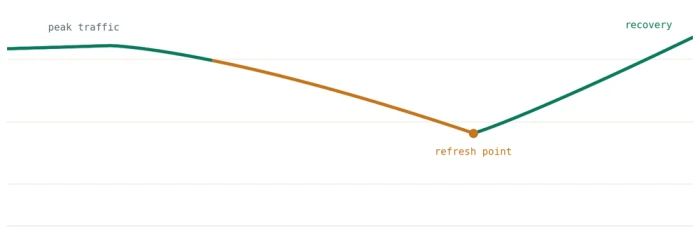
It is important to separate decay from other kinds of traffic loss. Decay is gradual and page-specific, unfolding over months rather than days.
A sudden site-wide drop usually points to an algorithm update, a technical problem, or a manual action. A dip that repeats at the same time every year is seasonality, not decay. Diagnosing the pattern correctly saves you from fixing the wrong problem.
Key point: decay is normal, but ignoring it is optional. Sites that refresh content on a schedule consistently recover traffic that competitors quietly lose to the same slow slide.
Why Content Decay Happens
Decay is rarely caused by a single factor. Several forces usually work together to push a page down over time, and knowing which one is doing the damage tells you which fix to apply.
One of the biggest forces is freshness. Google explains in its overview of how ranking works that content freshness matters more for some queries than others, which is why time-sensitive topics decay fastest.
1. Fresher competing content
Every month, competitors publish new articles targeting the same keywords you rank for. Many of them study your page first and deliberately build something deeper, newer, and better structured.
Search engines gradually reward those newer pages as they collect engagement signals. Your page does not get worse, but it becomes comparatively weaker, and comparison is all that matters in rankings.
2. Outdated information
Statistics, screenshots, prices, tool names, and examples all go stale. A guide referencing data from three years ago signals to both readers and search engines that the page is no longer maintained.
Users notice staleness quickly, and it shows up as shorter visits and faster returns to the search results. Those weakening engagement signals then accelerate the ranking decline.
3. Shifting search intent
The meaning behind a keyword can change even when the words stay the same. A query that once called for a beginner guide may now call for a comparison, a template, a tool, or a video.
When intent shifts, search engines reshape the entire results page around the new expectation. A page built for the old intent decays no matter how well written it is.
4. SERP layout changes
Answer boxes, AI-generated summaries, video carousels, and other result features keep pushing traditional listings further down the page. A page can hold its exact ranking and still lose a large share of its clicks.
This is why click-through rate can fall while impressions stay flat. The page is still visible, but fewer people scroll far enough to choose it.
5. Keyword cannibalization
As your site grows, newer posts often overlap with older ones on the same topic. Search engines then split relevance signals across multiple URLs instead of concentrating them on one strong page.
The result is that all of the overlapping pages rank worse than a single consolidated page would. Cannibalization is one of the most common self-inflicted causes of decay on large blogs.
6. Fading authority and technical drift
Backlinks disappear over time as linking pages get deleted, redesigned, or redirected. Internal links also drift toward newer content, leaving older pages with fewer signals of importance.
Small technical issues pile up too, such as broken outbound links, slow-loading embeds, and images that no longer render. Each one is minor alone, but together they drag the page down.

Competitors study your ranking pages and build against them, which makes standing still a losing strategy.
How to Identify Content Decay Early
The goal of detection is to catch decline while it is still shallow. A page that has lost 15 percent of its traffic is easy to recover. A page that has lost 70 percent is closer to a rebuild.
The process below takes a few hours per quarter and works for sites of any size. Run it on a fixed schedule so decline never gets a full year to compound unnoticed.
Step 1: Build a baseline inventory
Export a list of every page that matters, along with its peak monthly traffic and its primary target keyword. This inventory is your reference point for every future comparison.
Without a recorded baseline, decay is easy to rationalize away as normal fluctuation. With one, a 20 percent decline is a fact you can act on.
Step 2: Run six-month comparisons in Search Console
Open Google Search Console, go to the performance report, and compare the last six months against the previous six months. Sort the page list by click difference so the biggest losers rise to the top.
Flag every URL with a meaningful decline, then open its query view. Note whether the losses come from one keyword collapsing or from small drops across many keywords, because the two patterns need different fixes.
Step 3: Check engagement, not just traffic
Traffic tells you the page is slipping, but engagement tells you why. In Google Analytics, open the landing page report for your flagged URLs and review engagement time, engagement rate, and conversions.
Falling engagement alongside falling traffic usually means the content no longer matches what visitors expect. Stable engagement with falling traffic points instead to a visibility problem, such as lost positions or a changed results page.
Step 4: Confirm the topic still has demand
Before investing in a refresh, verify that people still search for the topic at all. A quick check in Google Trends shows whether interest in the subject is steady, seasonal, or permanently declining.
If demand itself has collapsed, no refresh will bring the traffic back. In that case, redirecting the page to a related resource is a smarter use of its remaining authority.
Step 5: Build a decay watchlist and prioritize
Collect every confirmed decaying page into a single watchlist with three columns: traffic lost, business value, and estimated effort to fix. Score each page and sort by the best return for the least work.
High-value pages with light fixes go first. Low-value pages with heavy fixes go last, or get consolidated into stronger pages instead of being refreshed at all.
Know the warning signs
These are the most reliable early signals of decay and what each one typically means for your diagnosis.
TABLE 2. EARLY WARNING SIGNALS OF CONTENT DECAY
| Signal | Where to Check | What It Usually Means |
|---|---|---|
| Clicks falling for two or more quarters | Search Console performance report | The page is steadily losing positions or appeal in results |
| Impressions stable but click-through rate dropping | Search Console queries view | Competitors or SERP features are winning the click instead of you |
| Average position slipping for the main keyword | Rank tracking reports | Fresher or more complete pages are outranking yours |
| A lost featured snippet or top spot for a key query | Manual SERP checks and rank tracking | A competitor now answers the query more directly than you do |
| Engagement time shrinking on the page | Analytics engagement reports | The content no longer satisfies current search intent |
| Referring domains decreasing over time | Backlink monitoring reports | The page is losing the authority signals that supported it |
How to Fix Decaying Content
Once you have a prioritized list of declining pages, resist the urge to rewrite everything from scratch. The right fix depends on why the page is decaying, and most fixes are far lighter than a full rewrite.
Work through the six strategies below in order for each page. Many recoveries only need the first two or three.
1. Refresh facts, data, and examples
Replace outdated statistics, screenshots, prices, and tool references with current ones. Update year mentions in the title and body, and remove sections describing things that no longer exist.
Check every outbound link and fix the broken ones, because dead links are a strong staleness signal to readers. This pass alone often recovers a page whose structure is still fundamentally sound.
If you are unsure how much the page has drifted over time, the Wayback Machine lets you compare today's version with earlier snapshots. Seeing what the page looked like at its traffic peak often reveals exactly what was lost in later edits.
2. Realign with current search intent
Search your target keyword in an incognito window and study what ranks today. Look at the format, the depth, the angle, and the media types of the top five results.
If the top results are comparisons and your page is a general guide, the format itself has fallen out of step. Rework the structure to match the format searchers now prefer, while keeping your unique insights intact.
3. Deepen and expand coverage
Open the query report for the page and find the questions it gets impressions for but does not answer well. Add sections that answer those questions directly, and close the gaps that top-ranking pages cover but yours does not.
Google's guidance on creating helpful content is a useful checklist during this step. It keeps the update focused on genuine reader value rather than word count for its own sake.
4. Consolidate competing pages
Search your own site for every post targeting the same query, then pick the strongest URL as the survivor. Merge the best material from the overlapping posts into that one definitive page.
Redirect the retired URLs to the survivor with 301 redirects, and update internal links so they point at the consolidated page. Concentrating relevance and authority on a single URL routinely outperforms three overlapping pages combined.

Mapping overlapping URLs before consolidating them prevents accidental loss of ranking pages.
5. Strengthen internal links and republish
Point internal links from newer, high-traffic pages to the refreshed article using descriptive anchor text. Add the page to relevant hub or category pages so crawlers and readers can both find it easily.
Then update the modified date and republish. Only change the date when the update is substantial, since cosmetic edits with fresh dates erode trust with both users and search engines.
6. Rebuild authority and redistribute the page
Treat the refreshed article like a new launch. Share it with your email list, post it on your active social channels, and mention it in any newsletters or communities where it fits naturally.
If the page previously earned links for a specific statistic or resource, update that asset and let the original linkers know it has been improved. Recovered and new links restore the authority signals that faded during the decline.
What not to do: do not change the URL during a refresh unless absolutely necessary, do not delete declining pages without a redirect, and do not update dates without real changes. Each of these throws away equity the page spent years earning.

Plan the refresh before editing: cause first, then fix, then measurement.
Match the fix to the situation
Use this quick reference to choose the right strategy once you know why a page is declining.
TABLE 3. MATCHING THE FIX TO THE SITUATION
| Situation | Recommended Fix |
|---|---|
| Information is outdated but the structure still works | Update statistics, examples, and dates, then republish the page |
| The page targets the right keyword in the wrong format | Rework the format to match what currently ranks for the query |
| Several of your posts compete for the same query | Merge them into one strong page and redirect the weaker URLs |
| The content is thinner than current top results | Expand coverage with new sections and supporting answers |
| Impressions are stable but clicks keep falling | Rewrite the title and meta description to win the click back |
| The topic no longer has meaningful search demand | Redirect the page to the closest relevant resource on your site |
How to Measure Recovery After a Refresh
A refresh is a hypothesis, and measurement is how you confirm it worked. Record the refresh date for every updated page so you can compare performance before and after with precision.
Give each refreshed page four to eight weeks before judging the result, since re-crawling and re-ranking take time. During that window, watch clicks, average position, and engagement time against the pre-refresh baseline.
If the page recovers, note which fixes you applied so you can repeat the pattern on similar pages. If it does not move after two months, escalate to a deeper intervention such as a full rewrite, a format change, or consolidation into a stronger page.
Rule of thumb: a successful refresh typically shows its first movement in impressions and average position within two to four weeks, with clicks following after. No movement at all usually means the diagnosis was wrong, not that refreshing does not work.
How to Prevent Content Decay Before It Starts
Fixing decay page by page works, but preventing it at scale requires a system. Prevention costs a fraction of recovery, because a shallow decline needs a light touch while a deep one needs a rebuild.
Run audits on a schedule
The foundation of the system is a structured content audit, which gives you a full inventory of your pages, their performance, and their refresh priority in one place. Run it at least twice a year so no page can decline for long without being noticed.
Each audit should end with three lists: pages to refresh, pages to consolidate, and pages to redirect or retire. That output feeds directly into your refresh calendar for the next two quarters.
Build a refresh calendar
Assign every important page a review interval based on how fast its topic moves. Fast-moving topics need frequent attention, while true evergreen content can safely wait longer between reviews.
TABLE 4. SUGGESTED REVIEW INTERVALS BY CONTENT TYPE
| Content Type | Suggested Review Interval | Why This Interval |
|---|---|---|
| News and trend commentary | Every 3 months | These topics can become inaccurate within weeks of publishing |
| Statistics and data roundups | Every 6 months | Numbers age quickly and readers actively check their recency |
| Product and tool guides | Every 6 months | Interfaces, features, and pricing change several times a year |
| Pillar and cornerstone pages | Every 6 months | High-value pages justify more frequent attention than average |
| Evergreen how-to guides | Every 12 months | Fundamentals shift slowly, but examples and references still age |
Assign ownership and prioritize by value
Every page on the refresh calendar needs an owner, because unowned maintenance work never happens. One person should be responsible for running the quarterly comparison and triaging the watchlist.
Finally, prioritize by business value rather than traffic alone. A page that drives conversions deserves attention before a page that only drives visits, even when the raw traffic numbers say otherwise.

A refresh calendar turns content maintenance from a reaction into a routine.
Final Thoughts
Content decay is not a sign of failure. It is simply what happens to good content in a search landscape that never stops moving, and it affects every site that publishes long enough.
The websites that keep winning treat published content as a living asset rather than a finished project. They detect decline on a schedule, match each fix to its actual cause, and measure every refresh against a recorded baseline.
Set a quarterly detection routine, keep a prioritized watchlist, and let a structured audit drive your refresh calendar. Do that consistently, and you will recover the traffic your competitors are quietly losing to the same slow slide.