
Seven screenshots, one lazy homework prompt, and a close look at what an AI answer engine built for students actually gives you.
iAsk AI makes a promise most AI chatbots avoid: no hallucinations, and every answer backed by authoritative citations. That is a bold claim for any AI search engine, so I put it to the test the way a real student would. I opened the homepage, kept every default setting, typed a rough homework prompt about black holes, and paid attention to everything that showed up on screen.
This iAsk AI review walks through that session step by step, with a screenshot and a note on what I saw at each stage. After the walkthrough you will find what real users say on Trustpilot and elsewhere, a breakdown of iAsk Free versus iAsk Pro, the strongest alternatives, and a verdict on who should bother.
What is iAsk AI?
iAsk AI is a free AI answer engine built by Ai Search Inc. Instead of returning a ranked list of links, it reads your question in plain language, pulls from web sources it treats as authoritative, and writes a direct answer with numbered citations. The company aims it squarely at students and researchers: the homepage calls it an AI homework helper and says its answers are refined through feedback from more than 3 million student and researcher users.
The core search is free and sits inside a wider toolkit. From the same site you can reach an AI Video Tutor, a URL and document summarizer, a document analyzer for PDFs and papers, a writing tool, a Chrome extension, an iOS app, topic modes for finance, business and law, and a paid tier called iAsk Pro.
The headline claims are aggressive. iAsk says its answers are grounded in live web content, that it does not store personal data, and that it scored 86.55% on the MMLU benchmark, ahead of Claude and ChatGPT on a comparison table it publishes itself. Those are vendor numbers, not independent tests. The rest of this review sticks to what you can see and check in a live session.
Landing on the homepage
The iAsk AI homepage is uncluttered. You get a pink-to-purple gradient, a large logo, the headline "Ask AI Questions, Receive Instant Answers," and one promise in a pill-shaped badge: "No Hallucinations, Authoritative Citations." Below that sits a single search box. The placeholder text tells you who the product is for: ask a homework question or anything else and receive a factual response from the world's most authoritative sources.
The navigation bar carries five items: Ask AI, Learn With AI, iAsk Pro, AI Video Tutor, and a Tools dropdown. Inside the search box there are four controls: a plus button for attachments, a mode selector, a response-length selector, and a microphone beside the purple submit button.
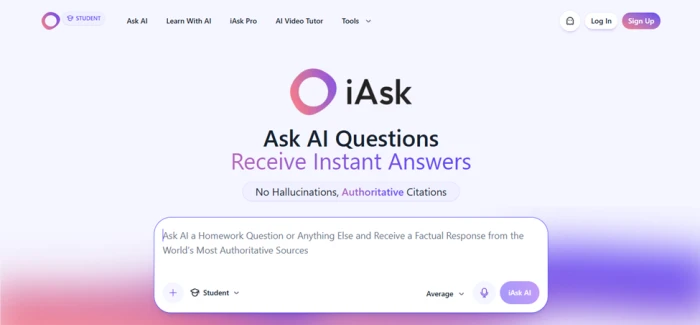
Screenshot 1: the iAsk AI homepage as it loads, logged out.
What I saw
The page loaded in a logged-out state, with Log In and Sign Up buttons in the top right, and I could type into the box straight away. A small STUDENT badge next to the logo told me the default mode before I opened a single menu. Nothing asked me to register, choose a plan, or pick a model.
Opening the mode menu
Click the Student label inside the search box and a dropdown reveals six modes. Each one changes what kind of sources iAsk AI leans on and how it shapes the answer. I kept Student for this test, so the descriptions of the other five come from their names and from how iAsk describes them on its own site.
| Mode | What it is for |
|---|---|
| Student | The default. Homework-style answers written for learners, with citations and a structured layout. |
| Guide Me | iAsk's tutoring mode, also linked from the nav as Learn With AI. Rather than handing over the answer, it walks you through a problem step by step. |
| Question | A plain, direct answer to a general question, without the student framing. |
| Thinking | A slower reasoning mode for questions that need more than a lookup. |
| Forums | Pulls from discussion boards and community threads. Useful for opinions, troubleshooting and lived experience. |
| Wiki | Restricts answers to encyclopedia-style reference sources. |

Screenshot 2: the mode dropdown, with Student checked by default.
Noticed
A checkmark sat beside Student, confirming the default. Each mode has its own icon: a graduation cap for Student, a leaf for Guide Me, a globe for Question, a lightbulb for Thinking, a speech bubble for Forums and a W for Wiki. Guide Me is the same thing the top nav calls Learn With AI, which took me a moment to work out. The Forums and Wiki options make this feel closer to a filtered search engine than a chatbot.
Picking a response length and submitting
To test iAsk AI like a real student, I typed a deliberately rough prompt: "i have to create a summer report on blackholes." No capitals, no question mark, and "blackholes" as one word. If the engine needs a polished query to perform, this would expose it.
Before submitting, I opened the second dropdown, labelled Average. It offers three lengths: Concise for a quick summary, Average for a few structured sections, and Detailed for an essay-style answer. I left it on Average and clicked the iAsk AI button.

Screenshot 3: the length dropdown open, with an ad card already loaded below the search box.
On my screen
Two things appeared the moment I started typing. A small X button showed up beside the length selector to clear the box, and a sponsored card slid in directly under the search box, labelled "Ad" in the corner. The ad was for a content distribution company and had nothing to do with black holes. The free web version is ad-supported, and iAsk markets both its mobile app and the Pro plan as the ad-free route.
The length control is smarter than it looks. On most chatbots you control length by rewriting your prompt and hoping the model listens. Here it is a fixed setting that applies to every answer. For a student who wants a two-line definition for a flashcard one minute and a full page for a report the next, that is one click instead of prompt engineering.
Reading the answer
The answer page is laid out like a short article, not a chat transcript. My prompt appears in a bubble at the top right with copy and edit icons. Under it sits a row of four buttons: copy, share link, read aloud and share. Then comes the piece itself, headed "Understanding Black Holes: A Comprehensive Guide."
The opening paragraph defines black holes as concentrations of matter so dense that nothing, including light, escapes, and it ends with a citation marker [1]. A line reading "Based on Ask AI & Question AI www.iAsk.Ai" separates the intro from the body. The first section, "The Anatomy of a Black Hole," breaks the object into two components in a two-row table: the singularity and the event horizon. Each cell carries its own citations, [2] and [3] for the singularity and [1] and [3] for the event horizon. The section then explains spaghettification, with the term set in bold.
Two floating buttons, Related Questions and Jump to Videos, hover above a follow-up box that reads "Ask a follow-up question," with its own microphone.
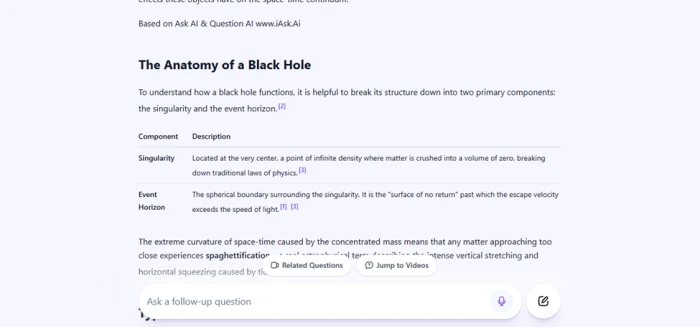
Screenshot 4: the body of the answer, with citations attached to individual table cells.
My read
The citations are the most convincing part. They attach to specific sentences, even inside table cells, rather than sitting in a lump at the end. The tone matched my prompt: it read like the skeleton of a school report, with a title, sections and a table I could lift straight into a document. What I could not judge from this screen is whether sources [1] to [3] are strong. The numbers link out, but a student still has to click them.
Scrolling down: videos, FAQ and saving
Scrolling to the end of the answer reveals a strip of related videos, an expandable "More Videos" row, and a banner inviting you to sign up for free to save the answer and return to it later. A FAQ block for the topic also lives down here.
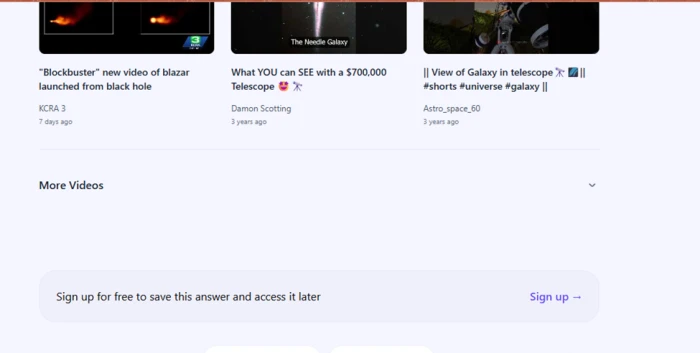
Screenshot 5: the video strip and the sign-up banner at the foot of the answer.
Worth flagging
Only one of the three videos was about black holes: a KCRA 3 news clip about a blazar jet, posted seven days earlier. The other two were general telescope videos from three years ago, including a short titled "View of Galaxy in telescope." The video picker seems to match on space keywords rather than the specific topic. Saving the answer and using the FAQ both require a free account, so a logged-out session is read-only.
Exploring the Tools menu
The Tools dropdown in the top nav lists six extras: the iAsk Chrome Extension, AI Summarizer, AI Assistant, Companion AI, Analyze Documents and Writing Tool. The summarizer turns a URL or long text into bullet points, Analyze Documents lets you upload a PDF and ask questions about it, and the Writing Tool is iAsk's essay and paper helper.
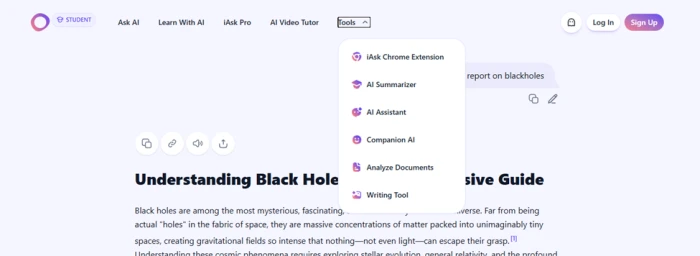
Screenshot 6: the Tools menu, opened over the top of the black holes answer.
Small detail
The menu opens over the answer without navigating away, so you can peek at the tools and carry on reading. Companion AI stood out: the pricing page describes it as 24/7 mental health support, an unusual thing to find inside a homework engine. Several of these tools, including document analysis, are limited or locked on the free plan, which the pricing page in the next step makes clear.
Checking the pricing: iAsk Free vs iAsk Pro
The iAsk Pro page lays out two plans side by side.
| Plan | Price | What you get |
|---|---|---|
| iAsk Free | $0 per month | AI search with limited ads, iAsk Writer for essays and papers, AI Summarizer for websites and long text, Search History, Companion AI for 24/7 mental health support, and a Personal AI Assistant for tasks and research. |
| iAsk Pro | $9.95 per month | Everything in Free, plus access to what iAsk calls the world's number one ranked AI, a Live AI Video Tutor for one-to-one learning, a Document Analyzer for essays and large files, a 100% ad-free experience, 300 daily Pro searches, and file upload for the AI Summarizer. |
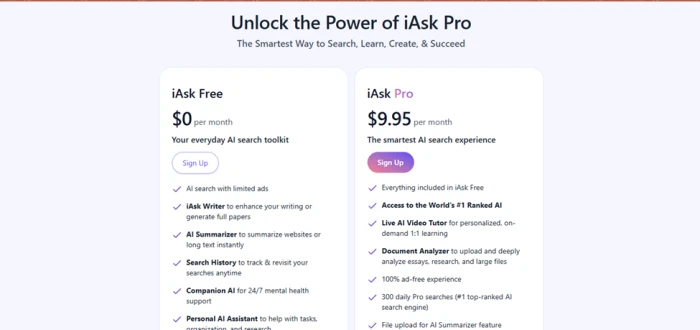
Screenshot 7: the two plans on the iAsk Pro page.
Takeaway
Everything I used in this test lives on the free plan. The Pro pitch rests on three things: removing ads, unlocking the live video tutor and document analyzer, and routing your searches through the top-ranked model. The 300 daily Pro searches cap is generous for a student and tight for a power user. MobileAppDaily reports that anyone with a valid .edu email gets a full year of Pro free, which I could not confirm from the pricing page itself but is worth checking before you pay.
What real users say about iAsk AI
My session was one prompt on one afternoon, so I went looking for what longer-term users report. The two most useful sources are Trustpilot, where anyone can post, and MobileAppDaily, which ran a multi-day editorial test in July 2026.
4.2 / 5 Trustpilot, 18 reviews. 78% five-star, 6% one-star. Trustpilot notes the company has never asked customers for reviews, so the sample is small and self-selected. Checked September 2026. | 4.6 / 5 MobileAppDaily editorial review. Scored features 4.5, pricing 4.8, performance 4.6, and UI 4.5. |
The praise
5 / 5 Uses iAsk for work research and writing so he can stop juggling a dozen tabs. Says the interface is simple and the tool "actually understands what I'm asking." Brian H., Trustpilot, January 2026 | 5 / 5 Works in education and uses iAsk to find videos and lesson-plan resources for high school students. Calls it the fastest and most reliable AI app she has tried. Jessica B., Trustpilot, December 2025 |
5 / 5 Leans on it for papers because it delivers concise information plus citations that point to longer material. Rodrigo A., Trustpilot, June 2025 | Positive Says "the accuracy blew me away" and that answers stay on topic instead of wandering off or inventing things. Likes the newer search-history feature for revisiting research. Phillip D., Slashdot |
The criticism
3 / 5 Hit repeated internal 500 errors on a Pro account, kept being billed, and could not reach support for a month. Raised the review from one star to three after support eventually fixed the problem. Didier V., Trustpilot, March 2026 | 2 / 5 Found the tool slow and said it had no contextual awareness from one message to the next. Trustpilot user, March 2025 |
1 / 5 Complained that answers felt out of date. John S., Trustpilot, November 2024 | Mixed The mobile version needs polish, switching between detailed and short answers feels clunky, and there is no dark mode. Phillip D., Slashdot (the same reviewer as above) |
Mixed Fast answers, but weak on personal recommendations and missing features such as asking questions about uploaded documents on the plan they used. G2 reviewer | Editorial Found doctoral-level topics oversimplified, called the free tier ad-heavy, and flagged the 300-search Pro cap as tight for heavy users. MobileAppDaily, July 2026 |
The pattern across sources is consistent with my own session. People like the clean interface, the speed and the citations. The complaints cluster around ads, depth on hard topics, and a few painful billing and support experiences on Pro.
Strengths and limitations
Where iAsk AI shines • Zero setup. No account, no model picker and no plan wall before your first answer. • Sentence-level citations, including inside tables. • Mode and length controls replace prompt engineering. • Report-shaped output a student can lift into a document. • The free plan covers the core search and the summarizer. | Where it falls short • Ads on the free web version, sometimes unrelated to the query. • Video suggestions matched loosely on topic. • Saving answers and the FAQ need an account. • Accuracy claims are self-published, not independently verified. • A few billing and support complaints on Trustpilot. • Reports of oversimplification on advanced academic topics. |
iAsk AI alternatives
iAsk AI competes with a crowded field of cited answer engines and general assistants. Here is how the main options differ from what I saw in this test.
| Tool | Best for | How it differs from iAsk AI |
|---|---|---|
| Perplexity | Cited answers with follow-up conversation | The closest competitor. Conversational threads, source cards and model choice on paid plans. Less student framing and no fixed length setting. |
| ChatGPT | Writing, brainstorming and long conversations | A general assistant first and a search tool second. Web search is available, but citations are not the default posture. |
| Google Gemini and AI Mode | Quick answers inside Google search | Tied to Google results and your Google account. Strong for everyday lookups, weaker as a dedicated study tool. |
| You.com | Customisable AI search | Lets you choose models and build custom agents. More controls than iAsk, less focus on homework. |
| Consensus | Academic literature | Searches peer-reviewed papers only. Better than iAsk for citing real studies in a university paper. |
| Microsoft Copilot | Windows and Edge users | Search-grounded chat built into the browser and OS. Fine for general questions, no student modes. |
If you already pay for one of these, iAsk AI is unlikely to replace it. If you pay for none of them and mostly need cited answers for coursework, it is the lowest-friction place to start.
Who should use iAsk AI
A good fit: high school and undergraduate students writing reports, teachers gathering explanations and resources, and anyone who wants a cited answer without a subscription or an account.
A poor fit: graduate researchers who need peer-reviewed depth, writers who want a conversational partner for drafting, and anyone who needs an ad-free experience without paying.
Verdict
iAsk AI does what its homepage says it will do, at least for the kind of question a student actually types. From a sloppy one-line prompt it produced a titled, sectioned, cited answer that would be a sensible starting point for a report, and it did so without an account, a model menu or a paywall. The rough edges are real: ads on the free plan, loosely matched videos, features that quietly require sign-up, and a handful of unhappy Pro customers on Trustpilot. None of them stop it from being worth ten minutes of your time.
Try it on your next homework question, then click one citation before you trust the answer. That single habit is what separates a good AI search engine from a good grade.