The first time you inherit a headless CMS, nobody warns you there will be no edit page button. You log in expecting a familiar dashboard with a live preview of the homepage, and instead find a tidy list of content types, a schema file open in the editor, and an API endpoint waiting to be called. It takes about a week to stop missing the old way and roughly a month to never want to go back.
Spend time on Sanity, wire Strapi into a Next.js storefront, or work through enough late nights inside Contentful's model editor, and the shape of the thing becomes clear. This guide is the explanation worth having on day one: what a headless CMS actually is, how it differs from the WordPress-style setup most people picture, where it genuinely helps, and where it costs you. No buzzwords, just what holds up once something has shipped.
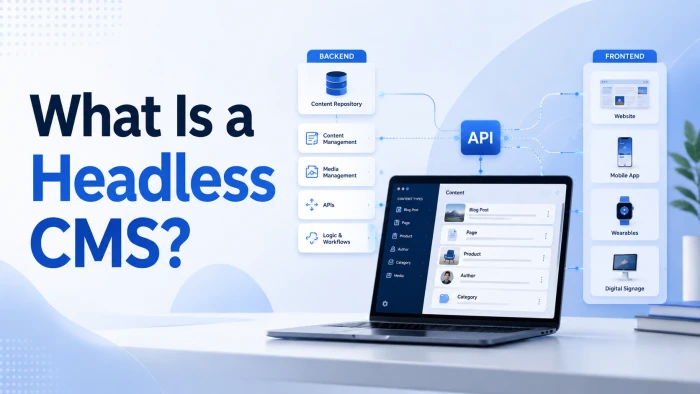
What is a Headless CMS? A headless CMS is a content management system that stores and organizes your content but does not control how or where it appears. It hands that job to any front end you choose and delivers the content through an API. The “head” (the public-facing template) is removed from the “body” (the content and the tools to manage it). That separation is where the name comes from. |
Why anyone calls software “headless”
In a traditional CMS, the part that manages content and the part that displays it are welded together. The display layer is the head. Cut it off, let developers attach their own, and you have a headless CMS. The content still lives safely in the body: a database, an editing interface, and an API that serves it whenever something asks.
The word sounds dramatic, but the idea is practical. You are refusing to let a content tool dictate your front end. What you build on top is your call.
How a headless CMS works: four parts, one missing on purpose
Every headless setup breaks down into the same four pieces. The last piece is the one you supply yourself.
Content repository (the body)
A database where every article, product, field, and image is stored as structured data rather than as a finished web page. Content here is clean and reusable, not locked to one layout.
Editing back end (the desk)
The admin interface where writers and editors create and organize content. No HTML to write, and no theme template to wrestle with while you work.
The API (the connector)
REST or GraphQL endpoints that deliver content to anything that requests it. This is the connective tissue that stands in for the missing head.
Any front end (you supply this)
The website, app, or screen you build, using whatever framework you prefer. It calls the API, receives the content, and decides how to present it.
Content repository → Editing back end → API → Your front end
FIELD NOTE On a typical build, the content repository and the website live in two separate codebases, deployed on two separate schedules. That sounds like more work, and setup-wise it is. In daily use it means the marketing team can publish at 2pm without waiting on an engineering release. That single change buys back hours every week. |

How it compares to the CMS you already know
Most people picture WordPress when they hear “CMS”. That is a traditional, monolithic system. Here is where headless sits next to it, and where the often-confused “decoupled” model fits between them.
| Trait | Traditional (monolithic) | Decoupled | Headless |
|---|---|---|---|
| Front end included | Yes, built in and inseparable | Yes, but you can attach your own | None. You build it |
| How content ships | Renders finished pages itself | Via API, with a default head available | Via API only (REST or GraphQL) |
| Front-end freedom | Limited to themes and plugins | Flexible | Total |
| Typical examples | WordPress, Drupal, Joomla | Enterprise DXPs, “headless WordPress” | Sanity, Contentful, Strapi, Storyblok |
| Best suited to | One website, non-technical teams | Flexibility with a fallback UI | Multi-channel, developer-led teams |
The distinction people trip on: a decoupled CMS still keeps a front end you can switch on if you want it. A truly headless CMS never had one to begin with. Same separation of content and code, different default.
Why teams make the switch
These are the reasons that actually come up in planning meetings, not the ones on a sales slide.
One backend, every channel
Write a product description once and deliver it to your website, mobile app, smart TV interface, in-store kiosk, wearable, and voice assistant. The content is reused, not rebuilt per channel.
Front-end freedom
Build with React, Next.js, Vue, Svelte, Astro, or native mobile. Your CMS no longer dictates your stack, so developers use the best tool for the job.
Faster pages
Pair the API with static generation and a global CDN and you skip the rendering overhead a monolith carries. In practice that tends to mean quicker loads and healthier Core Web Vitals.
Independent scaling
Scale the public site and the content backend separately. A traffic spike hits a cached CDN layer, not your editing environment, so publishing stays smooth under load.
Smaller attack surface
There is no public admin login bolted onto the live site. Access is governed by granular permissions, and content can stay private inside the editorial process until you choose to release it.
Future-proofing
Swap the CMS, the framework, or any single service without rebuilding the whole stack. When a new channel appears, you point it at the same API instead of starting over.

Where it costs you, honestly
Nobody puts these on a sales slide, so here they are plainly. Every one of them is manageable, but only if you know it is coming.
A You build the front end
Nothing ships out of the box. There is no theme to install and go live. Budget for real front-end engineering and hosting from the start, because that work does not do itself.
B The preview gap
The classic “see the page exactly as you type” experience is not native to most headless tools. Editors moving from a page builder feel it immediately. Storyblok and hybrid setups close most of the gap, but treat it as a real adjustment, not a footnote.
C More parts to run
A headless stack is usually the CMS plus a framework, hosting, a CDN, and often separate search or commerce services. More integration points mean more to maintain and more that can break at 4am.
D Cost shifts, sometimes sharply
The license can look cheap while the build is not. Watch API overages and tier jumps. Contentful's first paid tier starts around 300 dollars a month, which lands hard on teams used to a 20 dollar plugin.
E It needs a developer
A solo marketer with a single brochure site does not need this, and pushing it on them slows the whole project down. Headless rewards teams that have engineering to spend.
F Overkill for simple sites
If you have one straightforward website and no plans for more channels, a traditional CMS will get you live faster and with less to think about. Reach for headless when the complexity earns it.
FIELD NOTE The preview gap is the single most common complaint content teams raise after a migration. If your editors live and die by visual page-building, weigh that heavily before committing. It is a solvable problem, but only if you plan for it up front instead of discovering it in week three. |

The direction is not subtle
Analyst numbers vary because they measure different slices of the same trend, so read the arrows, not the decimals. Two data points stand out: steady growth, and satisfaction from the teams already there.
$1.75B → $6.23B Projected headless CMS software market, 2025 to 2033, at roughly 17.5% a year. Source: Grand View Research. | 35% Share of surveyed teams already running a headless CMS. Source: Storyblok, State of CMS. |
89% Of those teams reported gains in time, budget, or productivity after switching. Source: Storyblok. | 4,800+ Brands on Contentful, which Salesforce agreed to acquire in June 2026 to power its Agentforce AI agents. |
Market sizing for this category ranges widely between research firms because “headless CMS”, “headless commerce”, and “composable content” get measured differently. Treat any single figure as a signpost rather than gospel.
The platforms worth knowing
There is no single best headless CMS, only the right one for your team's shape. These are the names that keep surfacing on real projects, and where each one earns its place. Prices are current as of mid-2026 and move often.
| Platform | What it is | Pricing | Best for |
|---|---|---|---|
| Sanity | Schema defined in code, a real-time Content Lake, and its own GROQ query language. | Free (20 seats); Growth from $15/seat; Enterprise custom | Developer-led product teams, multi-channel content |
| Contentful | Mature enterprise SaaS with a global CDN and strong governance. Being acquired by Salesforce. | Free (limited); paid from about $300/mo | Enterprises in, or heading toward, the Salesforce stack |
| Storyblok | Component-based CMS with the best visual editor in the category. Drag, drop, preview live. | Free Starter; Growth from about €99/mo | Marketing teams who build and preview pages themselves |
| Strapi | The leading open-source option. Self-host for free, with REST and GraphQL out of the box. | Open source (free); Strapi Cloud from about $15/mo | Teams wanting full control, no lock-in, in-house DevOps |
| Hygraph | GraphQL-native, with content federation that pulls from several backends at once. | Free tier; paid from about $99/mo | GraphQL-first teams unifying many sources |
| Payload | Open source and TypeScript-first, a natural fit for Next.js. Ships an official MCP server. | Open source; managed cloud available | Next.js teams wanting CMS and app in one codebase |
Two things worth knowing this year. First, Salesforce signed a definitive agreement on June 1, 2026 to buy Contentful and wire it into its Agentforce AI agents; the deal was expected to close later in Salesforce's fiscal 2027 and had not closed at the time of writing. Second, the AI shift is real. Strapi and Payload now ship Model Context Protocol servers so coding agents can manage content directly, and Sanity, Storyblok, and others build AI writing and workflow features in rather than bolting them on. Content infrastructure is quietly turning into AI infrastructure.
FIELD NOTE One lesson that outranks the platform choice: how you model your content matters more than which logo you pick. The teams that see fast returns invest in content modeling and editor training early. A well-modeled Contentful build beats a sloppy Strapi one every time, and the reverse holds just as firmly. |

How to tell if you actually need one
Skip the trend and answer for your own situation. If most of the first list sounds like you, go headless. If the second does, think hard first.
GO HEADLESS IF • You publish to three or more channels, such as web, app, kiosk, or voice. • Your front end is developer-led and built on a modern JavaScript framework. • You need to reuse the same content across several products. • Performance and multi-channel reach are priorities, not afterthoughts. |
THINK TWICE IF • You have one straightforward website and a small team. • You have no front-end engineers to build and maintain the head. • Your editors depend on visual page-building and live preview. • You need to launch this week, not next quarter. |
Caught in between? If you want API-first delivery but your editors still need visual authoring, look at Storyblok or a hybrid-headless setup before ruling headless out entirely. You can often have both the flexibility and the friendly editing screen.
The Verdict
A headless CMS is not automatically better than the WordPress-style setup it is usually sold against. It is a trade. You give up out-of-the-box convenience and gain control over performance, channels, and your entire front end. When you have the channels to justify that trade and the engineers to build it, the payoff is real, and going back feels like a downgrade. When you do not, it is extra work wearing the costume of progress.
The part most teams underestimate early is that the value lives in structured content, not the tool. Model your content well and it will outlast three front-end rewrites without complaint. Model it carelessly and no platform on this page will rescue you. The logo you choose is a rounding error next to that decision.
IF YOU ARE STARTING FRESH IN 2026 If you are comfortable with a framework like Next.js, begin with Sanity or Strapi on their free tiers. Model one small piece of your content properly, wire it to a simple page, and sit with how it feels before you spend a cent. That single afternoon will teach you more than any guide, this one included. |