

Blaze AI has earned a solid reputation as an all-in-one marketing engine. It scans your website, writes a content strategy, and auto-schedules posts across social, blog, and email. For a lot of small businesses and solo founders, that hands-off approach is exactly the appeal.
But it is not the right fit for everyone. Some users run into failed content generations, credit costs that add up faster than expected, and video output that misses the mark. Others simply need something more focused, whether that is stronger long-form writing, a dedicated script-to-video tool, or a fast way to clean up AI-sounding text.
If you are shopping around, the good news is there are plenty of capable options. Below are six alternatives worth considering, each tested and scored by the team. We have kept the focus on what each tool does well and who it suits best, so you can quickly see which one matches your workflow.
Quick comparison
| Tool | Best for | Type | Score |
|---|---|---|---|
| Fliki AI | Turning scripts into video | Script-to-video | 7.6 |
| Use AI | Research and all-round help | General assistant | 7.0 |
| Jenni AI | Academic, long-form writing | Writing assistant | 7.0 |
| Humanize.ai | Cleaning up AI text | Text humanizer | 8.3 |
| HIX.AI | A broad multi-tool suite | All-in-one suite | 4.0 |
| Grammarly | Editing and proofreading | Writing editor | 3.6 |
How these tools differ from Blaze AI
Blaze is a marketing autopilot. Most alternatives are more specialized. Here is the core split.
BLAZE - The autopilot model Reads your website once, then plans a whole content strategy for you Auto-schedules across social, blog, and email from one dashboard Runs on a credit system, so heavy use gets expensive fast Aims to replace an agency rather than assist a writer | ALTERNATIVES - The specialist model Each does one job well: video, research, academic writing, or editing You stay in control of what gets made and when Often cheaper for a single task, or even free to start Easier to combine, for example draft in Jenni then polish in Grammarly |
Fliki AI | 7.6 / 10 |
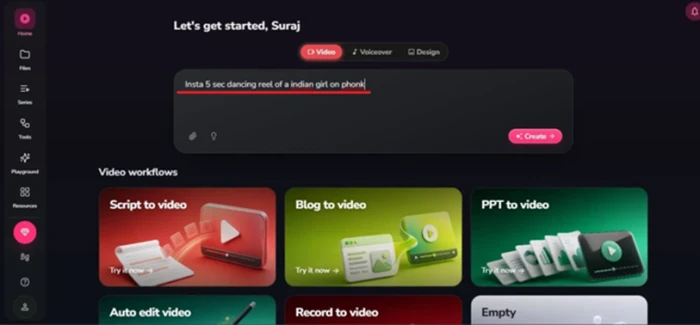
Fliki's console: type an idea or pick a workflow like script-to-video or blog-to-video.
If your content plan leans heavily on video, Fliki is one of the smoothest ways to get there. You hand it a script, a blog post, or even a one-line idea, and it builds a full video with realistic AI voiceovers, captions, and scene-by-scene editing.
Where Fliki really shines is voice quality and ease of use. It supports a wide range of languages and natural-sounding voices, and the idea-to-script flow does a lot of the creative lifting for you. Beginners and busy creators like that they can go from a rough concept to a finished clip without touching traditional editing software.
PROS Turns a rough one-line idea into a full shot-by-shot script Excellent, natural AI voices with wide language support Clean, beginner-friendly editor with per-scene control Great for YouTube automation and social clips | CONS Generation can be slow and occasionally errors out Free plan caps exports at 720p and adds a watermark Visuals sometimes drift from the script Not built for frame-precise professional editing |
| Best for: Content creators who want fast script-to-video with strong voiceovers. |
Use AI | 7.0 / 10 |
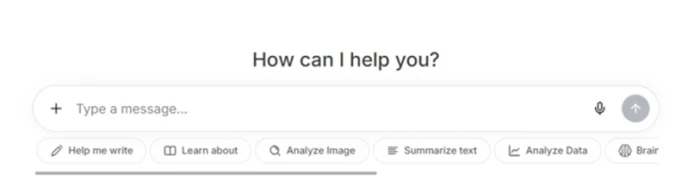
Use AI's home screen: one chat box with quick actions for writing, summarizing, and analysis.
Use AI is less of a marketing autopilot and more of a flexible all-purpose assistant. It handles quick research, document and PDF summaries, drafting, and image generation, all from one clean interface. If your day involves a mix of writing, research, and light content work, it can replace several single-purpose tools.
Reviewers consistently praise how fast and concise the answers are, along with the time it saves on research and outlining. The image generation is generally solid, and the document review feature is popular with students and knowledge workers who deal with long files.
PROS Fast, concise answers that save real research time One workspace for writing, research, and images Strong document and PDF summarizing Simple interface that new users pick up quickly | CONS Trials can convert into recurring charges Refund requests are sometimes slow to resolve Many useful features are locked behind Pro Occasional image outputs miss the prompt |
| Best for: Knowledge workers who want quick research and general AI help in one place. |
Jenni AI | 7.0 / 10 |
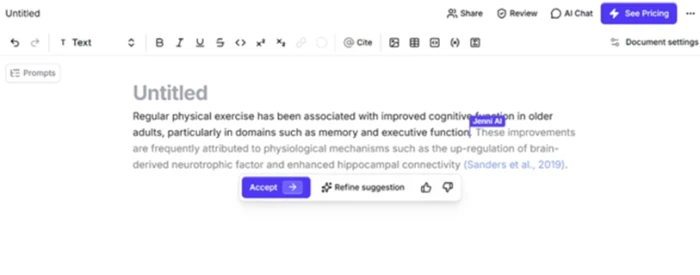
Jenni's autocomplete continuing a seeded sentence, with a citation attached.
Jenni AI takes a different angle from Blaze. Instead of social scheduling, it focuses on serious writing, especially academic and long-form work. It helps structure papers, generate citations, chat with uploaded PDFs, and push through writer's block.
Its strongest feature is editing rather than writing from scratch. Hand it a bloated sentence and it will tighten it up and explain what it changed, which is genuinely useful if you want to learn as you go. The personal research library and inline citation workflow are favorites among graduate students and researchers.
PROS Purpose-built for theses and long-form academic work Editing tools explain what they changed and why Personal library lets you cite from your own PDFs Helpful for non-native speakers polishing tone | CONS Citations can point to sources that do not fully fit Reference panel and detector sit behind the paid plan Auto-renewal and cancellation draw complaints Free tier is a small sandbox, not enough to write a paper |
| Best for: Graduate students and researchers writing papers and long-form content. |
Humanize.ai | 8.3 / 10 |
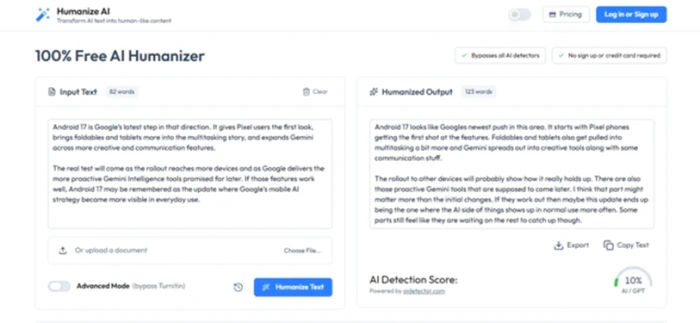
Humanize.ai output: pasted text rewritten with an AI-detection score shown below.
Not every alternative needs to do everything. Sometimes you just want one job done fast, and Humanize.ai is built around a single task: rewriting AI-generated text so it reads more naturally and scores lower on AI detectors.
It is about as frictionless as tools get. There is no sign-up or credit card required for basic use, it handles both pasted text and document uploads, and it processes short passages almost instantly. It even links to a built-in detector so you can check your output in nearly the same place. That simplicity is a big reason it earns one of the higher scores on this list.
PROS Works with no sign-up or credit card for basic use Rewrites short text almost instantly Handles pasted text and document uploads Built-in detector to check output in one place | CONS Detection results vary by which detector you use Best as an editing aid, not a guaranteed bypass Some billing complaints on the paid tier Can trim the word count during a rewrite |
| Best for: Students and casual writers who want fast, simple text rewriting. |
HIX.AI | 4.0 / 10 |
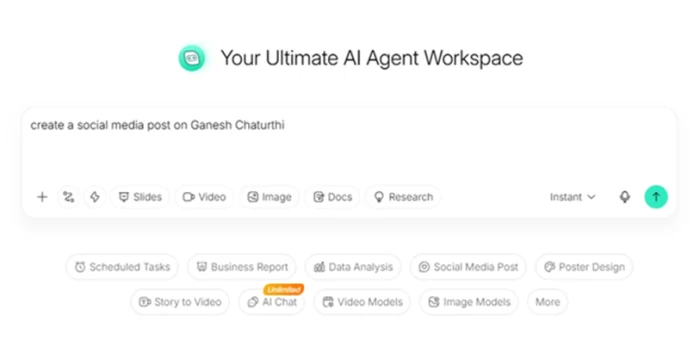
HIX.AI's agent workspace: one prompt box with mode chips for slides, posts, and more.
HIX.AI is the closest in spirit to Blaze in terms of breadth. It bundles paraphrasing, humanizing, slide generation, image and video tools, and an agent-style workspace into one suite. The single-box interface with one-tap mode chips makes it easy to say what you want and get moving.
When it works, the all-in-one convenience is the draw. Reviewers like getting a solid first draft to edit rather than starting from a blank page, and the slide agent visibly plans and researches before generating, which is a smart touch.
PROS Widest toolset here: writing, slides, images, video Low-friction single-box interface with mode chips Slide agent plans and researches before building Localized pricing and payment options | CONS Billing is the dominant complaint across review sites Cancellation and card removal can be difficult Credits can run out mid-task with nothing to show Humanizer output is inconsistent against strict detectors |
| Best for: Heavy content writers who want many tools in one place and will watch billing closely. |
Grammarly | 3.6 / 10 |
Grammarly is the most familiar name here, and it plays a different role than Blaze. Rather than creating campaigns, it polishes what you have already written, catching grammar, spelling, tone, and clarity issues in real time across almost everything you type.
It is not a content-generation engine, so on its own it will not replace Blaze for social posting or campaign building. But it makes a natural companion to any of the writing tools above, giving your drafts a final clean pass before they go out. For everyday editing and proofreading, it remains a widely used default.
PROS Real-time grammar, spelling, and clarity checks Works almost everywhere you type Great final pass to pair with any writing tool Familiar, low learning curve | CONS Not a content generator, so it will not replace Blaze Best features sit behind the premium plan Suggestions can feel repetitive or overcautious Limited value for campaign or social work |
| Best for: Anyone who wants reliable, real-time editing and proofreading support. |
Which one saves the most time?
A quick read on where each tool earns its keep day to day.
FASTEST WINS Humanize.ai rewrites text in seconds with no sign-up Use AI collapses research and drafting into one box Fliki AI turns a single line into a finished video | WORTH THE SETUP Jenni AI pays off across a long paper, not a quick note HIX.AI rewards you only if the credits and billing work out Grammarly quietly improves everything once installed |
Key differences at a glance
Same tools, lined up on the things that actually decide the choice: how they charge, what they are best at, and what to watch for.
| Tool | Free tier | How it charges | Biggest strength | Watch out for |
|---|---|---|---|---|
| Fliki AI | Yes, capped | Subscription plus credits | Natural AI voices, script to video | Slow, glitchy generation |
| Use AI | Limited | Trial into subscription | Fast research, all in one | Trial converts to paid |
| Jenni AI | Small sandbox | Monthly subscription | Academic citations and editing | Citation mismatches, auto-renewal |
| Humanize.ai | Yes, no signup | Free plus paid plans | Instant humanizing, zero friction | Detector results vary |
| HIX.AI | Limited credits | Credit bundles | Widest toolset in one place | Billing and cancellation issues |
| Grammarly | Yes | Freemium plus premium | Real-time editing everywhere | Not a content generator |
Blaze AI vs HIX.AI: the all-in-one showdown
HIX.AI is the closest rival to Blaze, since both try to be a whole toolkit in one place. Here is how the two broad suites stack up.
| Dimension | Blaze AI | HIX.AI |
|---|---|---|
| Score | 8.4 | 4.0 |
| Main job | Marketing autopilot | Broad writing suite |
| Standout feature | Website scan plus auto-scheduling | Breadth of tools in one box |
| Pricing style | From about $79/mo, credit based | Credit bundles, about $7 to $10/mo |
| Billing trust | Mixed, some disputes | Weak, the top complaint |
| Best fit | Consumer brands wanting hands-off | Heavy writers wanting many tools |
The short version: Blaze is the stronger and more polished autopilot, while HIX offers more raw tools but a shakier billing and reliability record. If you want breadth, go in with your eyes open on the credit system.
All-in-one tool or a stack of specialists?
The real fork in the road is not which tool, but which approach. Each has a clear trade-off.
ALL-IN-ONE - Blaze or HIX One login, one bill, and one consistent output style Less setup, since the tool plans the work for you You pay for tools you may never touch Reliability and billing risk sit with a single vendor | A STACK - Specialists combined Best tool for each task, from video to editing Often cheaper per job, and several start free More accounts and subscriptions to keep track of No single dashboard tying the work together |
How to pick the right one
• Want video content? Start with Fliki AI.
• Need broad research and drafting help? Look at Use AI.
• Writing papers or long-form pieces? Jenni AI is built for that.
• Just need to humanize AI text? Humanize.ai does it fast.
• Want an all-in-one suite? HIX.AI has the widest toolset, with billing caveats.
• Only need editing? Grammarly pairs well with any of the above.
A good rule of thumb is to test the free tier first, watch how credits or trials are structured, and only upgrade once you have seen the tool handle a real task end to end.
The bottom line
There is no single winner here, because these tools are not really competing for the same job. Blaze AI is still a strong choice if you want a true set-and-forget marketing engine and you have a consumer-facing brand for its website scan to work with. The catch is reliability and credit cost, so test the generation success rate over a full week before you commit.
If you would rather own the process, the alternatives each beat Blaze at one thing. Humanize.ai earns the highest score on this list for doing its one job cleanly and for free. Fliki AI is the pick for video, Jenni AI for serious academic writing, and Use AI for everyday research and drafting. HIX.AI has the widest toolset but the weakest trust record, so treat it with care.
| In one line: pick the specialist that matches your main task, start on the free tier, and only pay once you have watched the tool finish a real job. For most people that means Humanize.ai or Fliki AI first, with Grammarly running alongside whatever you choose. |