

WORDTUNE 4.6 G2 average · sentence-level tone | QUILLBOT 4.5 G2 average · nine rewrite modes |
THE SHORT ANSWER For rewrites that read like a person wrote them, Wordtune usually edges ahead. It works sentence by sentence, keeps your meaning, and offers three or four natural phrasings to pick from. QuillBot is the stronger all-round rewriter with nine modes, unlimited volume on premium, and a lower annual price, but its output can feel a little mechanical when you push the synonym slider. Choose Wordtune for tone and polish. Choose QuillBot for range, speed, and value. |
Before naming a winner, it helps to define the thing we are judging.
A rewrite sounds natural when a reader cannot tell a machine touched it. Three things give the machine away. The first is odd word swaps, where a tool trades a plain word for a showy synonym that no one says out loud. The second is broken rhythm, where sentence length and flow turn robotic. The third is meaning drift, where the point survives but the nuance quietly changes.
These two tools attack the problem from opposite ends. Wordtune rewrites at the level of a single sentence and treats tone as the main dial. QuillBot rewrites whole blocks and treats mode and synonym strength as the main dials. That difference in design explains almost every difference in how natural the results feel.
Meet the two tools
Wordtune · by AI21 Labs
● Rewrites one sentence at a time in context
● Formal and Casual tone toggle
● Three to four suggestions per line
● Shorten, expand, proofread, summarize
● Ask AI free-form prompts on premium
QuillBot · by Learneo
● Rewrites whole paragraphs at once
● Nine modes, from Standard to Creative
● Synonym slider for change strength
● Grammar, summarizer, plagiarism, AI detector
● Unlimited word count on premium
Wordtune positions itself as a writing coach that refines your voice. QuillBot positions itself as a full rewriting suite that also checks grammar, summarizes, and scans for plagiarism. One is a scalpel, the other a workshop.
How each one actually rewrites
The engine matters more than the feature list.
Wordtune: sentence-level, tone first
You highlight a sentence, press Rewrite, and Wordtune returns several fresh versions of that exact line. Because it only ever looks at one sentence in its surrounding context, it rarely trades a common word for an obscure one, and it holds the original meaning tightly. The tone toggle lets you slide the same idea from buttoned-up formal to relaxed casual without rewriting from scratch.
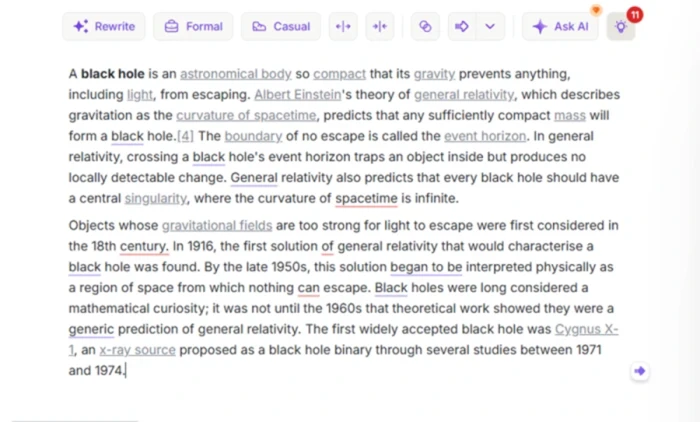
Wordtune's whole interface is the toolbar above your text. Rewrite, tone, shorten, expand and proofread each sit one click away, which keeps editing fast and low effort.
The multi-suggestion view is the quiet reason its results feel human. Instead of forcing one answer on you, it hands you a short menu and lets you keep the version that already sounds like you.
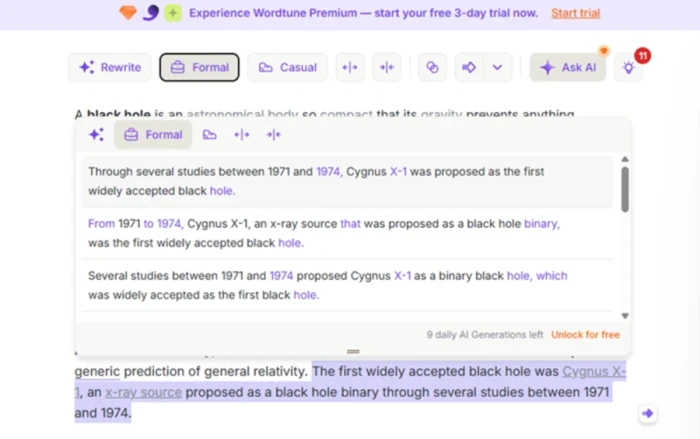
Several formal rewrites of one sentence. Each keeps the meaning and simply reshapes the phrasing, which is where Wordtune tends to read most naturally.
| Want to see every button pressed on a real paragraph? This piece pairs well with a full hands-on look at the Wordtune editor, which walks through the proofread panel, the tone rewrites, and where the free plan draws the line. |
The proofread panel is a smaller but genuinely useful part of the naturalness story. It flags issues in plain language, shows a before and after for each, and lets you apply everything with one button, so surface errors never distract from the flow of a line.
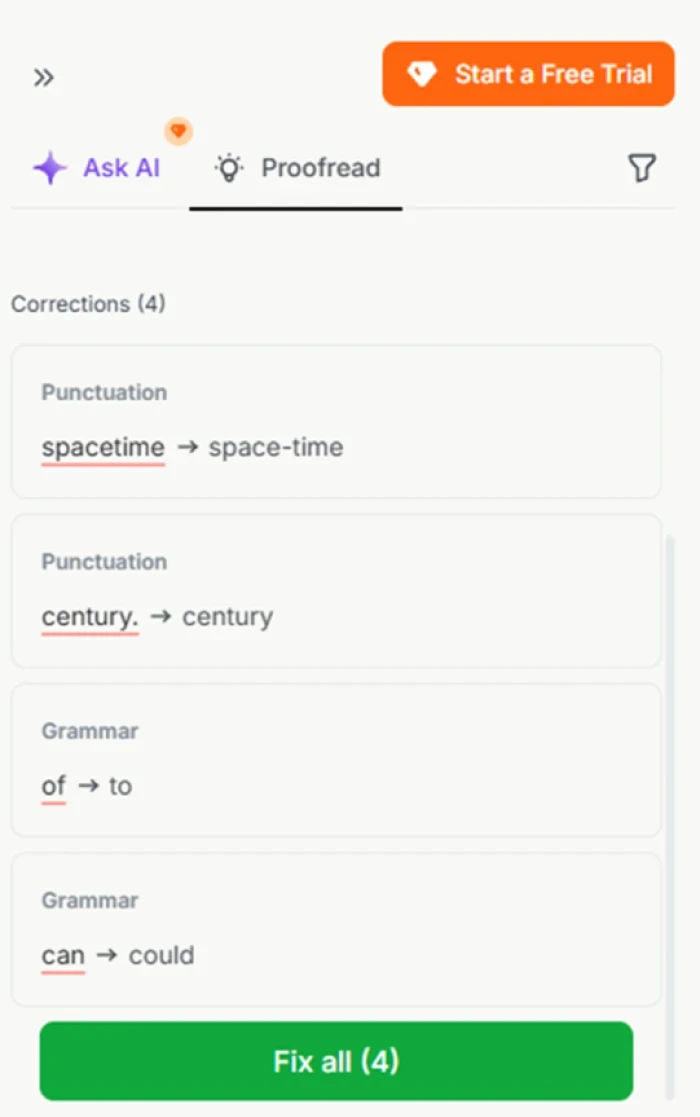
The proofread panel labels each fix by type and offers Fix all. It is free within the daily limit and handles the small errors that make writing read as clumsy.
QuillBot: mode driven, volume first
QuillBot takes a different route. You paste text, choose a mode, set how aggressively you want words changed, and it rewrites the whole passage at once. The nine modes give real range. Standard and Fluency keep things close to the original, while Creative and Shorten reshape more boldly. The trade is control for nuance. Push the synonym slider high and the output changes a lot, but it can start reaching for words a person would not choose.
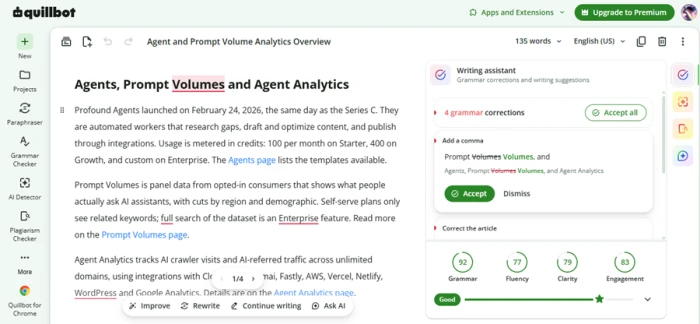
The QuillBot editor puts a full Writing assistant on the right, with one-click grammar fixes and live scores. The Improve, Rewrite, Continue writing and Ask AI bar sits under the text.
This block-level approach is superb for speed and for repurposing content across formats. It is less careful about the small human touches that Wordtune protects by design, which is exactly why reviewers describe QuillBot as fast and versatile, and describe Wordtune as natural.
The editor experience: coach vs command center
Open both and the philosophy is obvious within a second.
Wordtune gives you a blank page and a slim toolbar. There is nothing to read, nothing to configure, and nothing between you and the sentence you want to fix. That restraint is deliberate. It keeps your attention on the line, which is where natural phrasing is won or lost.
QuillBot gives you a workspace. A Writing assistant panel sits on the right with grammar fixes you can accept one by one or all at once, and a bar under your text offers Improve, Rewrite, Continue writing and Ask AI. It does more, and it shows more. For a heavy editing session that breadth is a genuine advantage. For a quick tone tweak it is more surface than you need.
The takeaway for naturalness is subtle but real. Wordtune's quiet interface nudges you to judge each rewrite by ear. QuillBot's busy interface nudges you to trust the scores and the accept buttons, which is faster but a little more hands-off. Neither is wrong. They simply reward different habits.
Writing scores, AI detection and plagiarism
This is where QuillBot pulls clearly ahead on breadth, and where Wordtune stays narrow on purpose.
QuillBot grades your draft as you write. It puts numbers on Grammar, Fluency, Clarity and Engagement and rolls them into a simple Good rating, so you get a quick read on whether a passage lands. It also ships a built-in AI Detector that estimates how much of the text reads as AI written, plus a Plagiarism Checker on premium. Wordtune offers none of these. It sticks to rewriting, tone and proofreading, and leaves detection and originality checks to other tools.
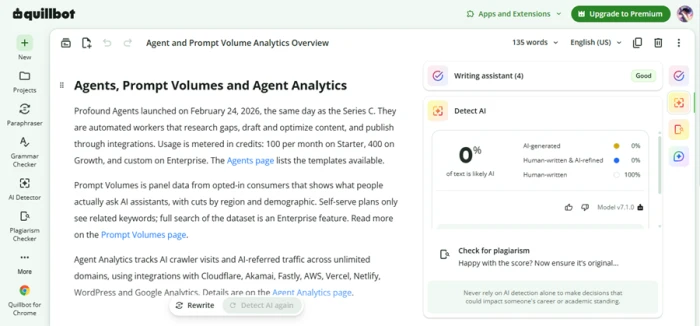
QuillBot's built-in AI Detector reports how human a passage reads, with a plagiarism check one panel below. Its own note is sensible: never rely on AI detection alone for decisions that affect a career or a grade.
Treat the detector as a rough gauge rather than a verdict. Independent testing of these scores is mixed, and QuillBot itself warns against leaning on them for high-stakes calls. Still, having grammar scoring, AI detection and plagiarism scanning in the same window is a real reason writers pick QuillBot as their one-stop suite, and a real gap in Wordtune's leaner toolkit.
Where the naturalness gap actually shows
The difference is not constant. It appears in specific places.
On short, ordinary sentences the two tools are close. Where they part company is at the edges. Long, tangled sentences are the first tell, since QuillBot rewrites the whole thing at once and can flatten the rhythm, while Wordtune reshapes the single line and keeps its cadence. The synonym slider is the second tell. Nudged high, QuillBot swaps plain words for showier ones that read as translated rather than written, which is the exact complaint that surfaces in its reviews. Voice is the third tell. When the goal is to sound like a specific person, Wordtune's menu of options lets you keep the version that already fits, and that choice is what makes the output feel human.
The honest summary is that QuillBot on its lighter modes is perfectly natural, and only drifts when you ask it to change a lot. Wordtune is built so that drift is harder to trigger in the first place. If you keep QuillBot's slider moderate and its mode on Standard or Fluency, the gap narrows to a matter of taste.
The free plan, and where each hides the paywall
Both are free to start. They just fence off different things, and that shapes who each free tier suits.
Wordtune limits you by count. The free plan gives roughly ten rewrites and AI suggestions a day, a few AI generations, and a small number of summaries a month, while spelling and grammar stay unlimited. Crucially, the tone tools are all there. You can rewrite, go formal or casual, shorten and expand within that daily cap. The one feature held back is Ask AI, the free-form prompt box, which asks for an upgrade the moment you use it.
QuillBot limits you by length and by mode. The free paraphraser caps each request at 125 words and unlocks only two of its nine modes, Standard and Fluency. The summarizer is capped, the plagiarism checker is premium only, and the AI detector is limited. So a free QuillBot user can rewrite as often as they like, but only in short chunks and only in two styles.
The practical read is simple. If you make lots of small edits and care about tone, Wordtune's free tier feels more generous, because every tone tool is unlocked. If you rewrite less often but want to keep trying different styles on a sentence, QuillBot's free tier gives you unlimited passes inside that 125-word ceiling. Neither free plan is a long-term home for heavy writers, and both funnel you toward the same upgrade, just from different directions.
Reach: apps, integrations and languages
A rewriting tool is only as useful as the places it follows you.
Both tools cover the essentials. Each has a Chrome extension, each plugs into Microsoft Word and Google Docs, and each can sit beside you as you type across the web. For most writers that shared base is enough. The differences show up at the edges of each ecosystem.
QuillBot leans wider. It adds a macOS app and a mobile app, a translator that spans dozens of languages, a citation generator for academic work, and a summarizer that stretches to several thousand words on premium. It is designed to be the single window you keep open for anything text related, from rewriting to referencing.
Wordtune leans deeper into the writing moment. Its extension works smoothly across email clients and editors, it pairs with tools like Grammarly rather than trying to replace them, and its summarizer handles articles, PDFs and even YouTube videos so you can pull ideas in as you write. For non-native English writers, its translation into natural English is a standout, turning a rough thought in another language into a line that sounds fluent.
The pattern mirrors everything else. QuillBot spreads out to do more jobs in more places. Wordtune stays focused on making the sentence in front of you sound right. Neither reach is better in the abstract. It depends on whether you want a suite or a specialist.
Test the naturalness yourself in five steps
You do not have to take anyone's word for it. Run the same short trial on both.
| 1 | Pick one rough paragraph Grab three or four clumsy sentences you actually wrote, not a clean sample. Real friction is where the tools separate. |
| 2 | Rewrite it in Wordtune, one sentence at a time Highlight each line, press Rewrite, and choose the suggestion that sounds most like you. Note how often you accept the first option. |
| 3 | Rewrite the same block in QuillBot on Standard Paste the whole paragraph, keep the synonym slider near the middle, and read the single output it returns. |
| 4 | Read both out loud Your ear catches what your eye skims. Listen for showy synonyms, broken rhythm, and any shift in what you meant. |
| 5 | Count the edits you still need The tool that leaves you with fewer manual fixes is the more natural one for your voice. For most writers that is Wordtune on tone and QuillBot on bulk. |
Rewriting power, side by side
Strip away the extras and this is the core of the decision.
| How it rewrites | |
WORDTUNE One sentence at a time, read in its context | QUILLBOT The whole paragraph in a single pass |
| Rewrite styles | |
WORDTUNE Rewrite, Formal, Casual, Shorten, Expand | QUILLBOT Nine modes plus custom, from Standard to Creative |
| Options you get per pass | |
WORDTUNE Three to four versions to choose from | QUILLBOT Usually one output, rerun for another |
| Natural tone control | |
WORDTUNE Strongest here: tone toggle plus a menu of phrasings | QUILLBOT Good on light modes, can feel mechanical high on the slider |
The pattern is the same one that runs through the whole comparison. Wordtune gives you fewer levers and more finish on each line. QuillBot gives you more levers and more speed across a block.
The toolkit around the rewrite
Beyond rewriting, one tool stays focused while the other spreads out.
| Grammar and live scores | |
WORDTUNE Grammar and proofread, no numeric scores | QUILLBOT Grammar plus Grammar, Fluency, Clarity, Engagement scores |
| Summarizer | |
WORDTUNE Articles, PDFs and YouTube videos | QUILLBOT Longer summaries on premium |
| AI detector and plagiarism | |
WORDTUNE Neither is built in | QUILLBOT Both built in, plagiarism on premium |
| Translation and citations | |
WORDTUNE Into natural English, non-native focus | QUILLBOT Dozens of languages, plus a citation generator |
| Apps and extensions | |
WORDTUNE Chrome, Word, Google Docs, web | QUILLBOT Same, plus a macOS and mobile app |
If you want a single window for grammar, detection, plagiarism, translation and citations, QuillBot is the fuller suite. If you want a specialist that stays out of the way, Wordtune keeps the toolkit small on purpose.
Plans and pricing, side by side
Both are free to start and cheap on an annual plan. The details differ in ways worth knowing.
| Free plan | |
WORDTUNE About 10 rewrites a day, but every tone tool unlocked. Ask AI is gated | QUILLBOT Unlimited passes, but capped at 125 words and 2 of 9 modes. No plagiarism |
| Premium, billed yearly | |
WORDTUNE Around 6.99 USD a month | QUILLBOT About 8.33 USD a month, billed 99.95 a year |
| Premium, month to month | |
WORDTUNE Roughly 9.99 to 13.99 USD | QUILLBOT 19.95 USD without a commitment |
Prices are in USD and move with promotions and billing cycle, so check each pricing page for today's figure. On an annual plan the committed cost is close. Month to month, Wordtune is the cheaper of the two, while QuillBot rewards a yearly commitment with a much lower effective rate.
What real users say
Ratings pulled from the major software review sites, with the praise and the gripes both kept in.
Wordtune
★★★★★ G2 · 4.6 Called out for being simple to use with accurate, varied suggestions. One reviewer sums the tool up as “super easy to use.” G2 verified user, content creation |
★★★★★ Capterra · 4.4 A long-time user notes that compared with other rewriters, “the Wordtune tool works very naturally,” keeping meaning and appeal intact. Capterra verified user |
★★★★★ TrustRadius One writer admits it is “almost frightening how good” it is at rephrasing a line or shifting its tone of voice. TrustRadius reviewer |
★★★☆☆ Trustpilot · 4.2 The steady complaint is the free cap of roughly ten rewrites a day, and a few users find the pop-up prompts distracting on long work. Common gripe across reviews |
QuillBot
★★★★★ Trustpilot · 4.8 Praised for smart paraphrasing that helps “reword awkward sentences while keeping my original tone,” making edits faster and less stressful. Trustpilot reviewer, 13,000+ reviews |
★★★★★ Capterra · 4.5 A heavy-writing user likes that it “corrects grammar and punctuation without altering the tone” of the message. Capterra verified user |
★★★★☆ G2 · 4.5 Newsrooms value how fast it turns wire copy into distinct, original versions, though they add that output still needs a human read. G2 product manager, small business |
★★★☆☆ G2 · con The recurring knock is tone. One reviewer says the sentences sometimes “sound robotic or a little off,” so manual cleanup is needed. G2 reviewer, on the synonym feel |
Aggregate scores as of 2026: Wordtune sits near 4.6 on G2, 4.4 on Capterra and 4.2 on Trustpilot. QuillBot sits near 4.5 on G2 and Capterra and around 4.8 on Trustpilot across many thousands of reviews. Both are well liked. The pattern in the words, not just the stars, is that Wordtune gets praised for sounding natural while QuillBot gets praised for speed and range.
Which is more natural, by use case
Polishing emails and short posts You want your own voice, only cleaner and clearer. | Wordtune |
Paraphrasing sources for essays You need distinct wording across longer passages, fast. | QuillBot |
Non-native English writers Natural phrasing that still sounds like a person. | Wordtune |
Repurposing content across formats Shorten, expand and reshape in bulk. | QuillBot |
Grammar, plagiarism and summaries in one place You want a full suite, not just rewriting. | QuillBot |
Fine tone control on a single line Formal to casual, with options to choose from. | Wordtune |
Best value on an annual plan Lowest committed monthly cost for heavy use. | QuillBot |
Free-form AI prompts inside the editor Ask for a specific rewrite in your own words. | Both, premium |
The Bottom LineOne reads more naturally. One does more. |
If natural is the whole point, Wordtune wins. Its sentence-by-sentence engine, tone toggle and menu of suggestions are built to keep your voice intact, and both the reviews and a hands-on session back that up. It is the tool you keep open to clean up your own writing.
If you want range and value, QuillBot wins. Nine modes, unlimited length on premium, a grammar checker, a summarizer and plagiarism scanning make it the more complete workshop, and its annual price is easy to justify for daily use. Keep the synonym slider moderate and its output stays clean.
PICK WORDTUNE For emails, posts, and any writing where sounding like yourself matters more than speed. | PICK QUILLBOT For essays, bulk rewriting, and a one-stop suite of grammar, summary and plagiarism tools. |